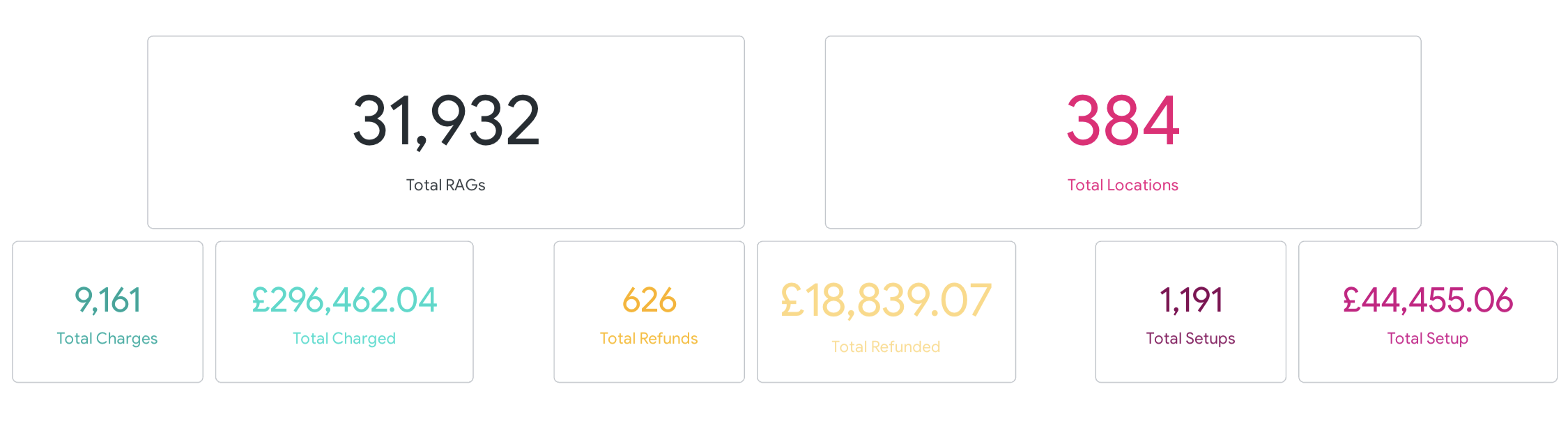
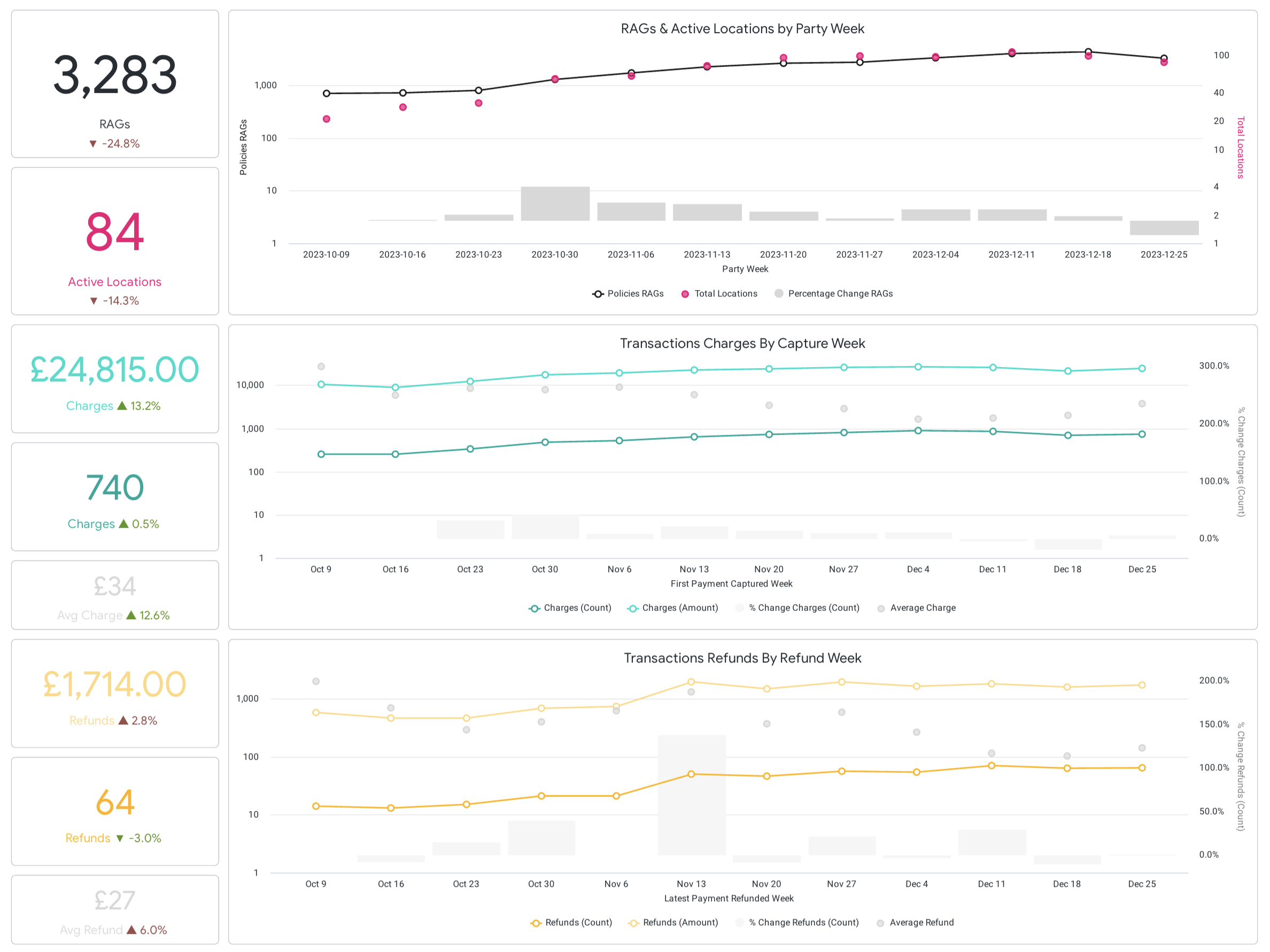
No-shows continue to frustrate and cause significant problems for restaurants. It’s one of the most common – and troublesome – issues eateries of all sizes face. Diners failing to attend can cause revenue disruptions and booking headaches. While there may be nothing more disappointing than an empty table as a result of a guest failing to fulfil their booking, there are ways to combat no-shows.
My role
- Define and understand the problem
- Competitive analysis
- User interviews
- Define MVP and iterations
- UX/UI Design
- User testing
- Cross-tribes comms
Context
The Dojo Booking and Queue experience touches both the hospitality businesses (customers) and their guests (consumers).
Restaurant Management System (RMS)
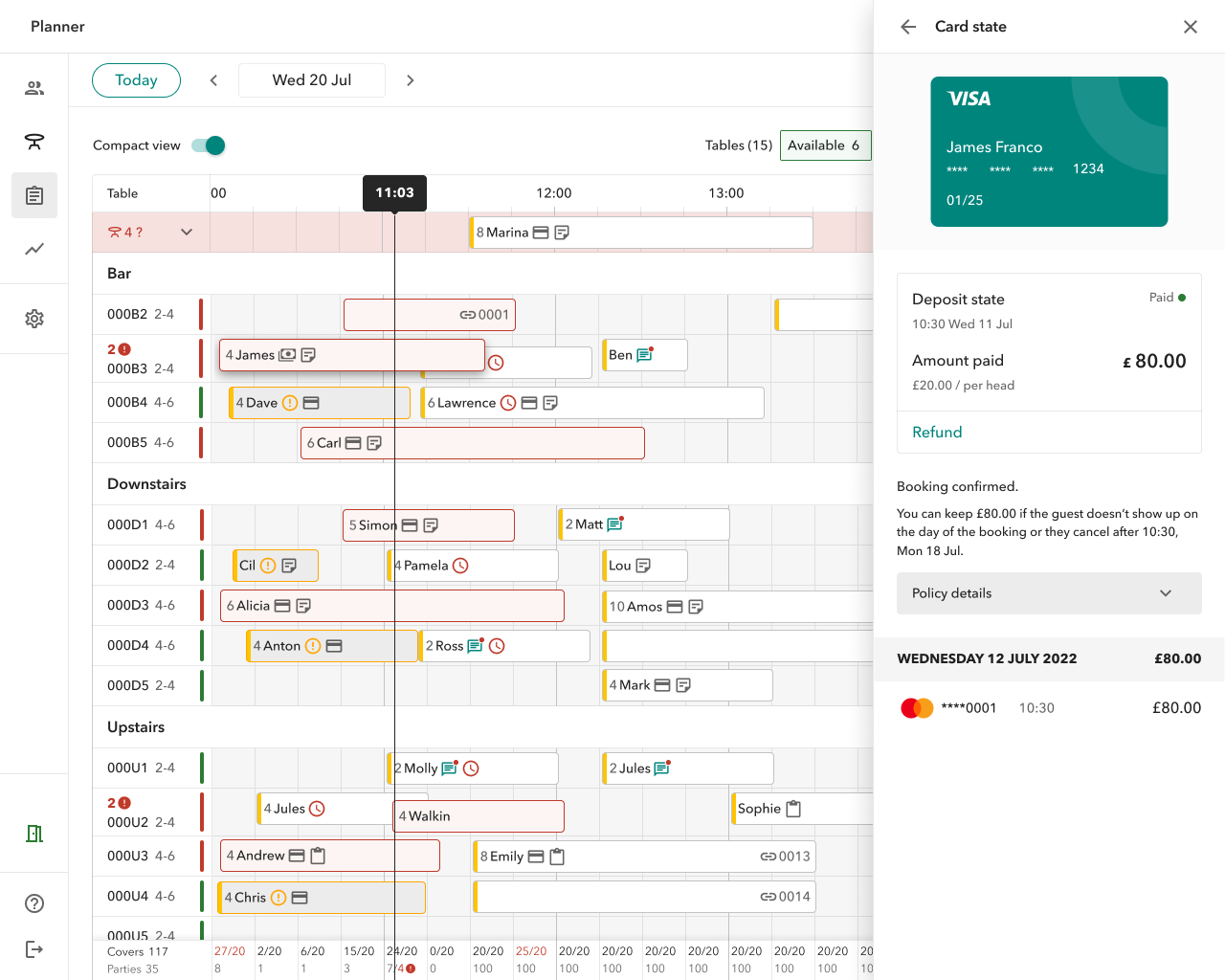
is the system that restaurants use during a shifts to manage bookings and queue places and seat walk-ins. When consumers book via Dojo app or restaurant website, the booking information will come through to the RMS. The system is also used to manage the restaurant details and settings (schedules, policies, experiences, opening times, queue and booking availability, etc).
The Dojo app
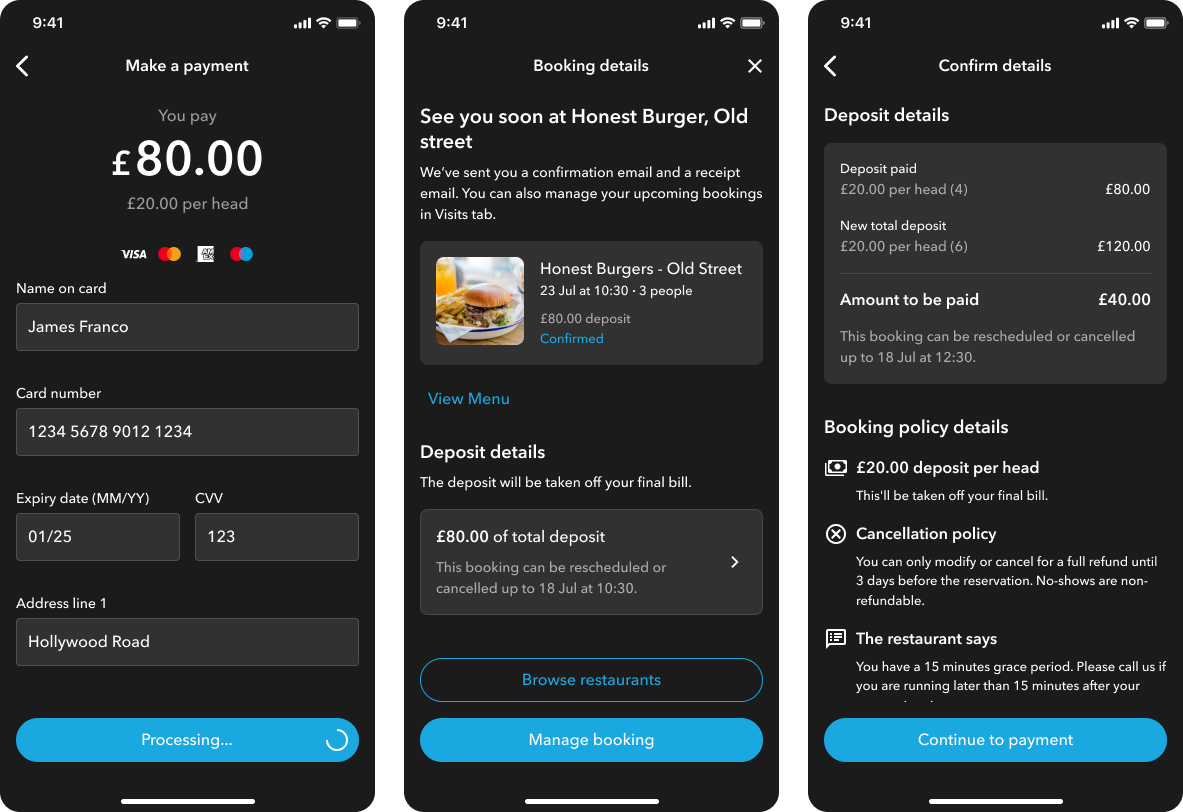
Consumers can use the app to check for local restaurants with availability to eat now, to join a virtual queue and book restaurants in advance. On the app users are able to check and manage their booking, chat to the restaurants and receive notifications about queue times.
The problem
As few as six people not showing up to a forty-seat restaurant in a single night can make the difference between profit and loss.
But what are no-shows?
No shows are the diners who make a reservation but don’t honour it for whatever reason. Maybe something comes up that prevents them from coming, maybe they decide to change their plans at the last minute, or maybe they completely forget they had a reservation. No matter why they don’t come, no shows cost restaurants precious revenue.
Industry numbers
1 in 5
is the average no-show rate in big cities
£16 bn
is what no-shows are costing the UK restaurant industry
15 mins
is the average time before declaring a no-show
Our numbers
73%
fulfilled bookings (seated guests)
20%
late cancellations / deletion (less than 24h)
7%
early cancellations / deletion
Target customers
Fine-dining restaurants and big chains

Restaurants offering a fine-dining experience and big chains often witness higher table-turnover.
- premium quality
- often busy
- booking done weeks in advance
- expect their guests to secure their booking
- cost of no-show/late cancellation is usually high
Small businesses with low guest intake

Includes businesses which are smaller in size and drive less guest intake
- get busy on special events and occasions depending on seasonality trends
- need to ensure staff availability (especially on such busy days)
- mostly in the outskirts or rural areas
- cost of no-show/late cancellation is about bring in more staff
Hypothesis
A new feature to secure bookings through requesting card details or an advance deposit from consumers will enables us to tap into additional segments in the market (+30% TAM increase and £3.5MM/year).
We could help our existing customer base of restaurants to (1) mitigate no-shows and last minute cancellations, and (2) unlocking events reservation and special consumer offers when needed (e.g. Saturday Brunches, Valentines’ Dinner).
Competitive analysis
Many of our competitors are offering different solutions to mitigate no-shows, providing a lot of value to their customers.
By conducting a competitive analysis I was able to assess the booking policy set up and management of our competitors, understand their pros and cons, as well as the way that booking policies were surfaced to consumers and their potential frustrations (which I experienced first hand).
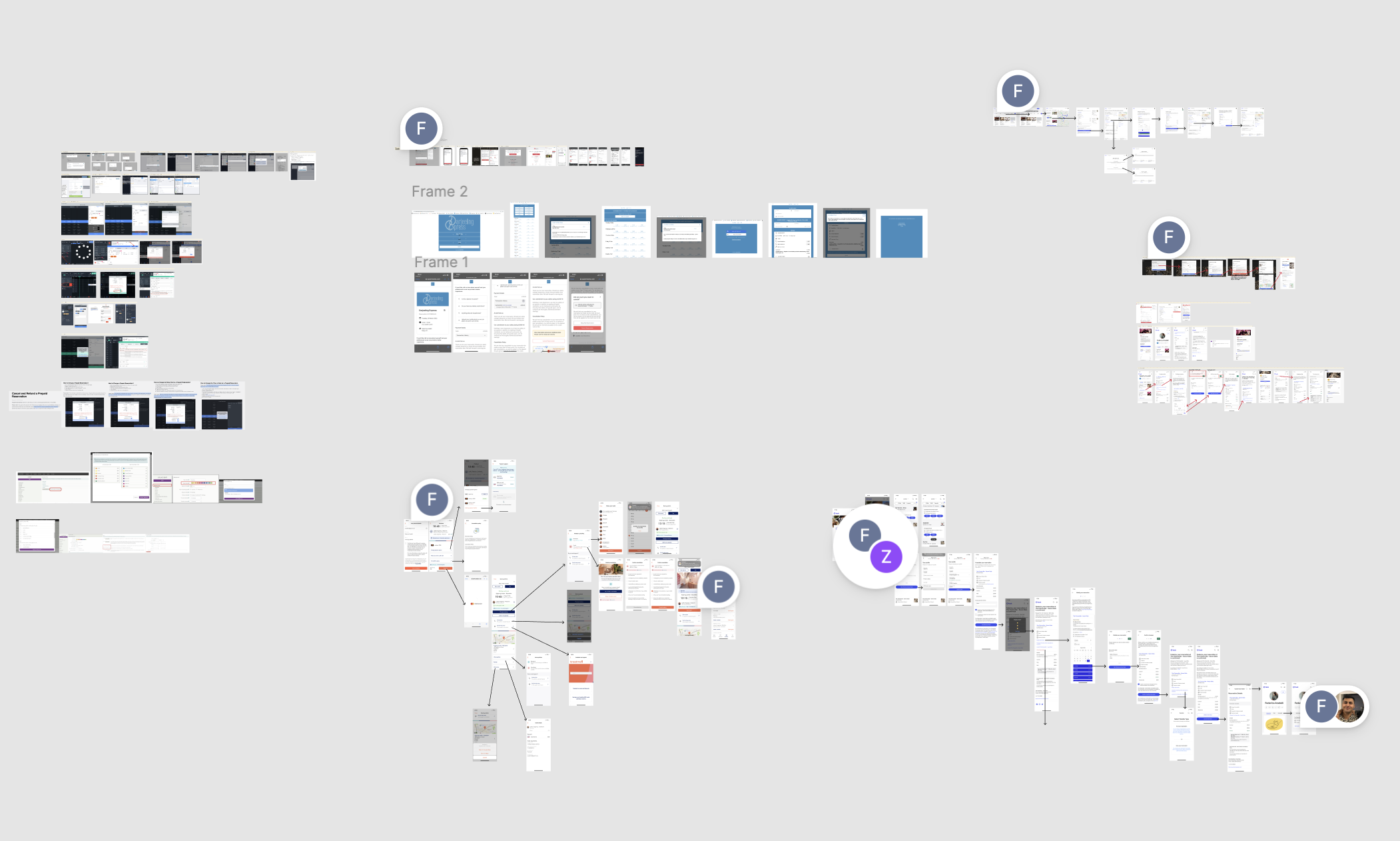
From the research I found out that our competitors were proposing a lot of different solutions and features to mitigate no-shows as: reminders and confirmation via sms or email, waiting lists, deposits, cancellation fees, pre-paid experiences, label bad behaving guests and educational pieces.
Something we had to clarify was the difference between deposits and cancellation fees.
What’s a deposit?
Restaurants may charge a deposit to secure a reservation. The deposit is paid with a credit card when the reservation is booked. This deposit amount will either be applied to the final bill or refunded. In case of no-show or late cancellation, the restaurant has the rights to keep the deposit amount to cover for the loss of money.
What’s a cancellation fee?
Restaurants may ask that you provide a credit card number to secure your reservation but no money is taken from the card upon booking creation. If the reservation is modified outside of the time window set in the cancellation policy, the restaurant may use the credit card details to charge a fee. Our competitors might refer to the cancellation fees transaction feature as card on file, card on hold, card authentication, active card check etc. We run a short survey with our customers and identify “card on file” as the best way to label this type of cancellation fee.
Open Table
Features
- Deposit
- Card on file
- Customisation
What is included?
- Policy time
Limit and/or conditions Setting a window of time by which this policy takes effect and shows up to guests - Cancellation window
Adjust the window of time guests can cancel their booking without being charged and breaking the policy agreement - Deposit type and penalty
Adjust minimum party size requiring deposit, deposit value (fixed/per head), as well as penalty value (fixed/per head) for breaking policy
ResDiary
Features
- Deposit
- Card on file
- Customisation
What is included?
- Cancellation windowAdjust the window of time guests can cancel their booking without being charged and breaking the policy agreement.
- Cancellation / no-show chargeAllow you to charge the card manually from within RMS per booking
- Deposit type and penaltyAdjust minimum party size requiring deposit, deposit value (fixed/per head), as well as penalty value (fixed/per head) for breaking policy
Discovery
How we can help our customers to mitigate no-shows by keeping a great booking experience for the consumers?
Customer interviews were ran on 15 contributors (hosts, managers, owners, waiters etc), all UK based, using different RMS.
Consumers interviews ran on 10 contributors, all UK based, different backgrouds and age; some more spontaneous some more “planners” type.
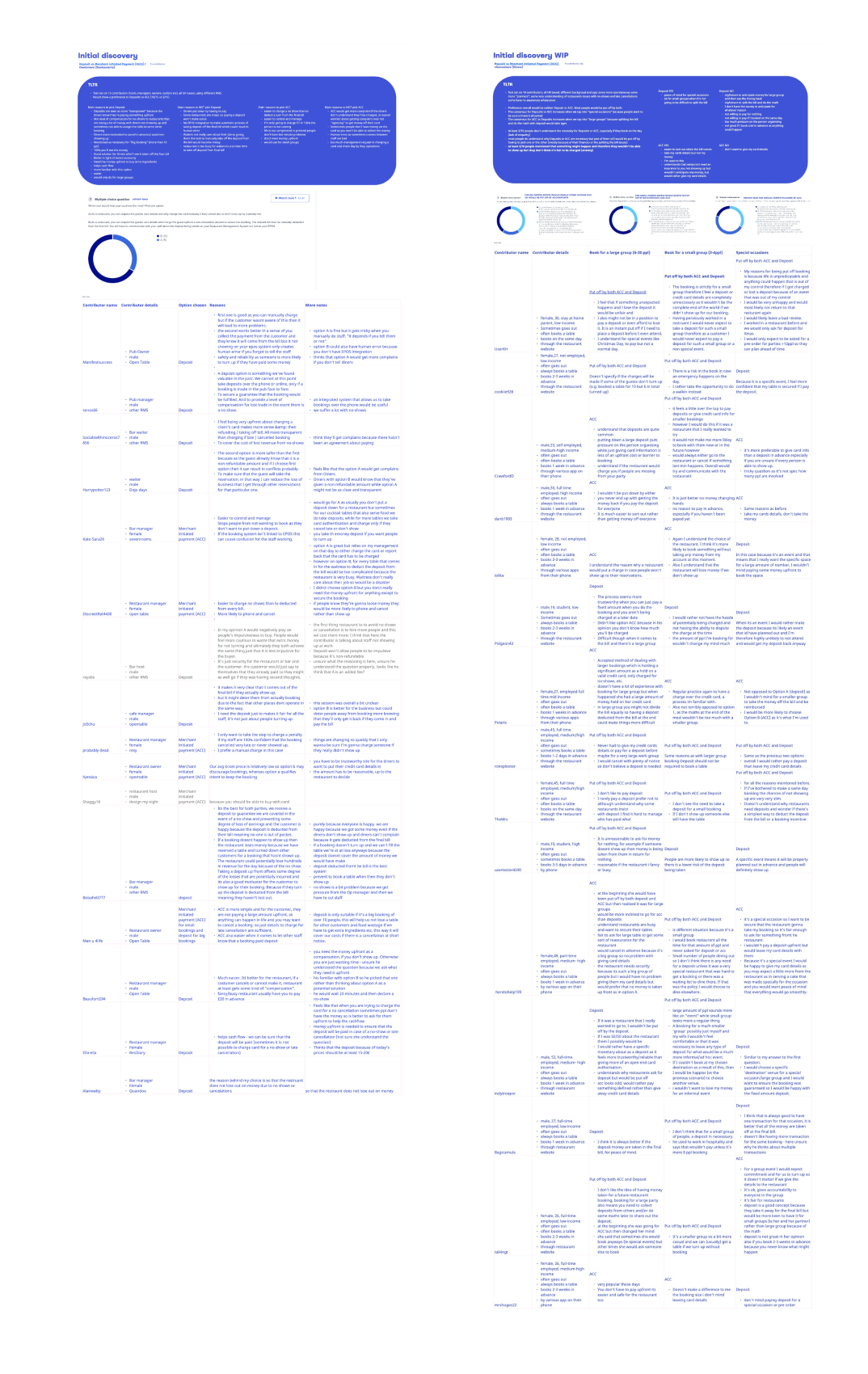
”Deposit is much easier. If a guest cancels or cannot make it, the restaurant at least gets some kind of compensation.
”Is easier to charge no shows than to deducted from every bill.
”I understand the reason why a restaurant would put a charge in case people won't show up to their reservations.
”I feel that if something unexpected happens and I lose my money it would be unfair.
> 60%
of restaurants prefer their guests to pay a deposit
50%
of our existing customers prefer deposits
55%
of consumers would pay a no-show fee
51%
of consumers would pay a deposit to secure a booking
Deposit
Customers
Pros
- Seen as more “transparent” because the diners know they’re paying something upfront
- Minimum level of compensation if they’re not able to re-assign the table
- Diners are more motivated to cancel in advance/ avoid non showing up
- Mentioned as necessary for “Big bookings” (more than 10 ppl)
- 100% you’ll see the money
- Better in light of recent economy
- Need the money upfront to buy extra ingredients
- Helps cash flow
Cons
- Diners might be put down by having to pay
- Restaurant is too cheap so paying a deposit won’t make sense
- No EPOS integration to make automatic process of taking deposit off the final bill which could result in human error
- Restaurant is too busy for waiters to also lose time to take off deposit from final bill
Consumers
Pros
- Peace of mind for special occasions
- Happy to pay upfront for small groups when it’s not going to be difficult to split the bill
Cons
- Nightmare to anticipate money for large group and then see the money back, split the bill and do the math
- Don’t have the money to anticipate for whatever reason
- Not willing to pay if they’ve booked on the same day
- Not great if I book a lot in advance as anything could happen
Card on file
Customers
Pros
- Easier to charge a no show than to deduct a sum from the final bill
- Only going to charge if 100% sure that the person is not coming
- Life is too complicated to pretend people don’t have last minute problems
- Don’t need money upfront
- Would use for small groups
Cons
- Would get more complains if the diners don’t understand they’ll be charged
- Sometimes people don’t have money on the card so you won’t be able to collect the money
- Too much management request in charging a card and check day by they operations
Consumers
Workshop
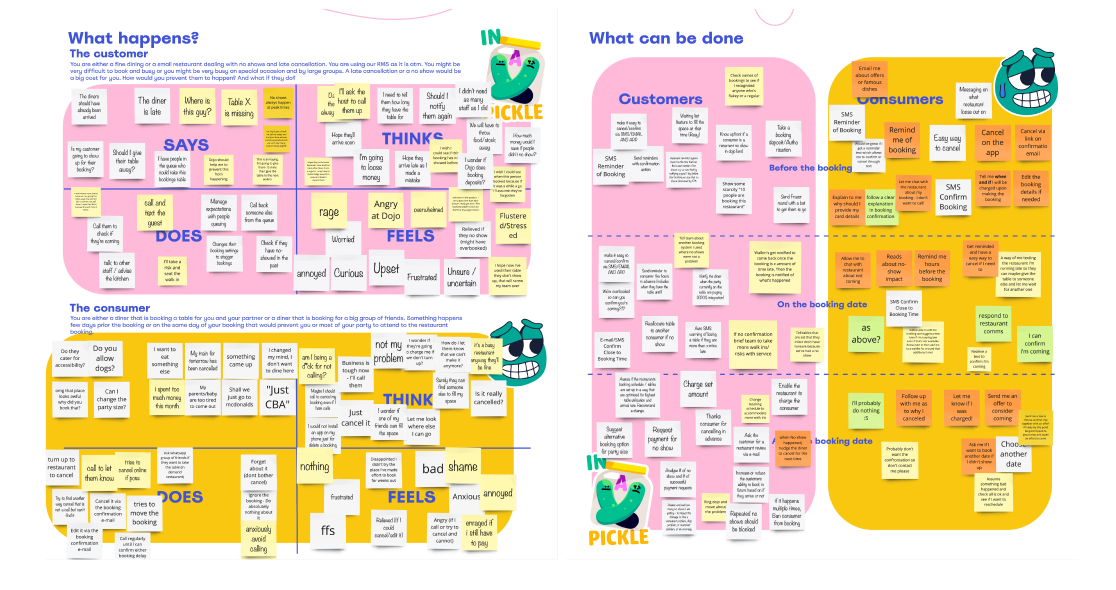
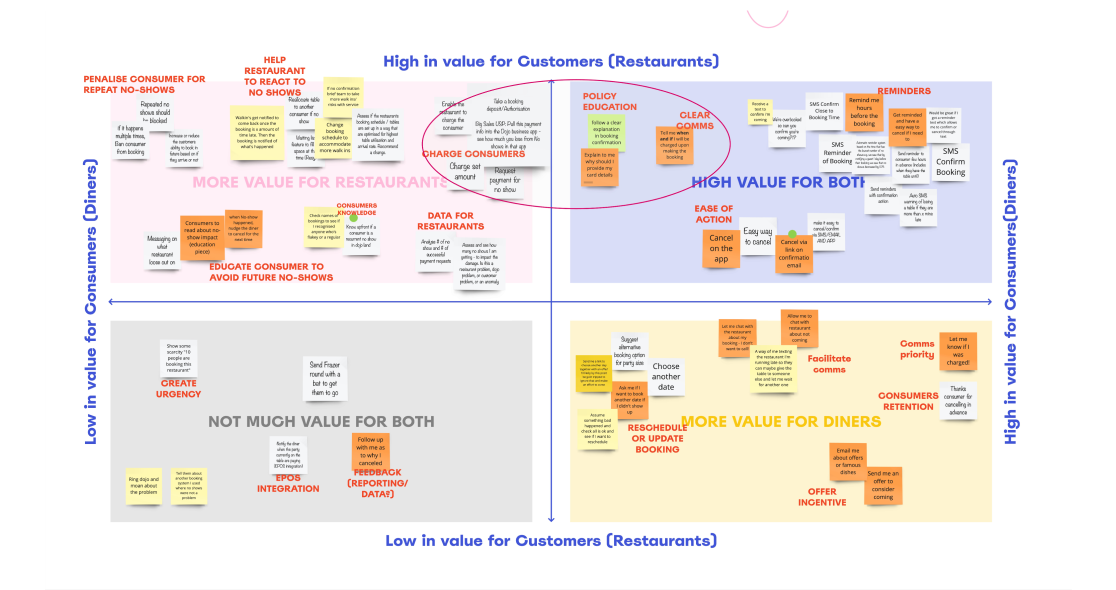
I believe it’s important to be on the same page with engineers early in the process. If they don’t have time to participate in the discovery journey, I like to share my findings with them and organise short workshop and involve them in an initial brainstorm phase. I always find it very useful as different points of view might bring up innovative ideas and uncover any technical blockers.
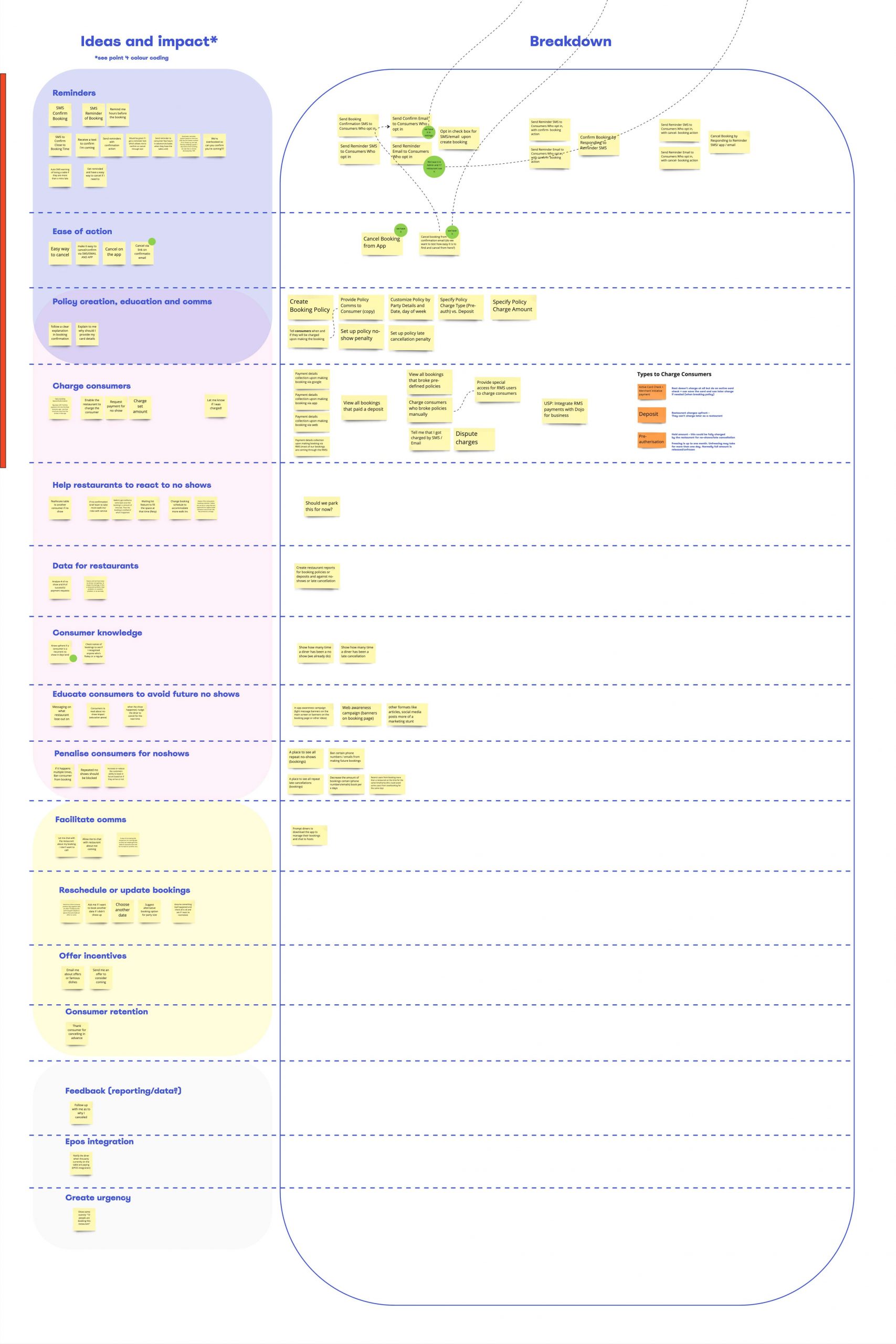
In this case we did an empathy mapping, brainstorm and a prioritisation matrix for both customers and consumers so we could understand what would have the highest value for both. As a results we identified 4 main areas: clear policy communication, easy way to cancel a booking with a policy attached, intuitive charge process and booking reminders.
User flow
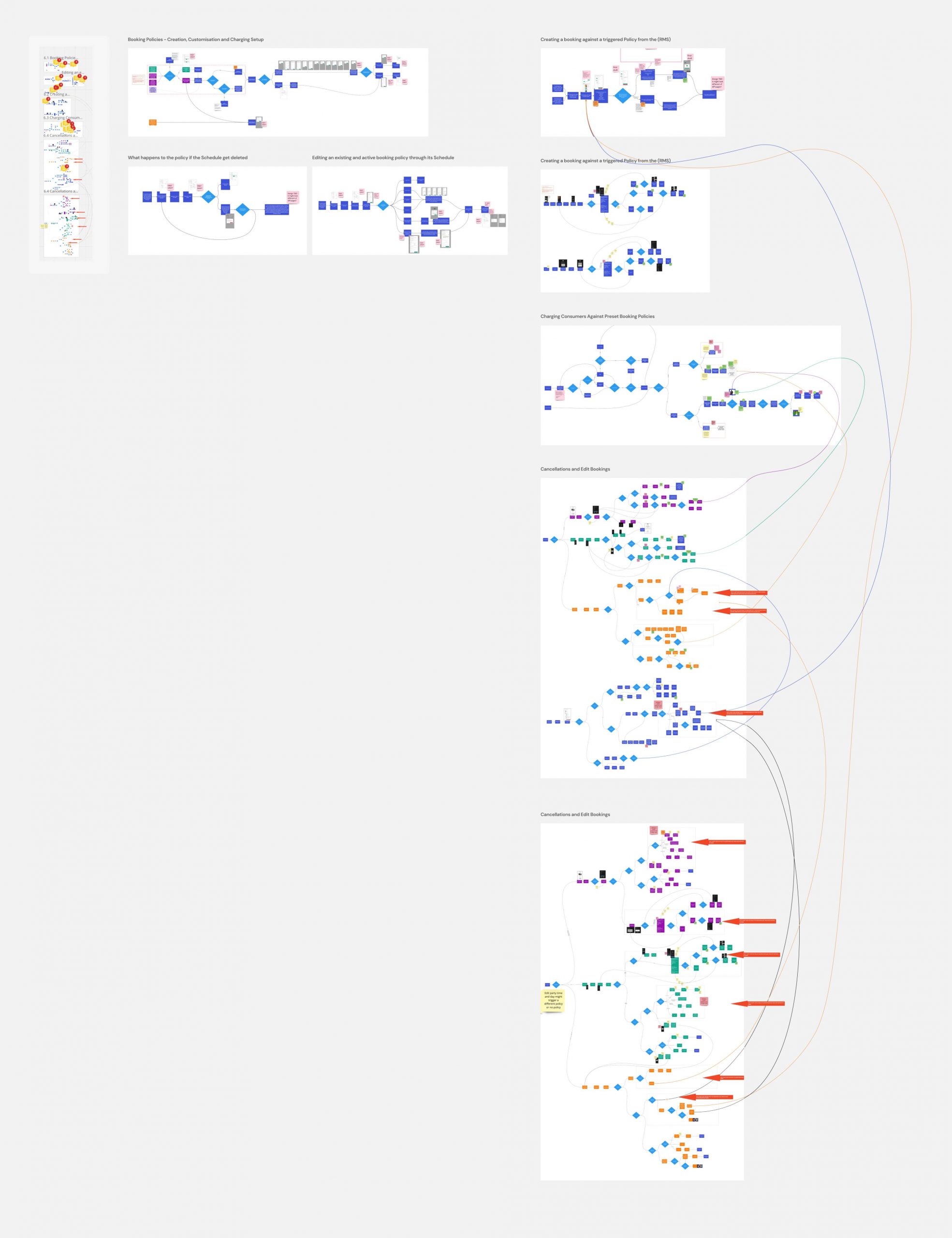
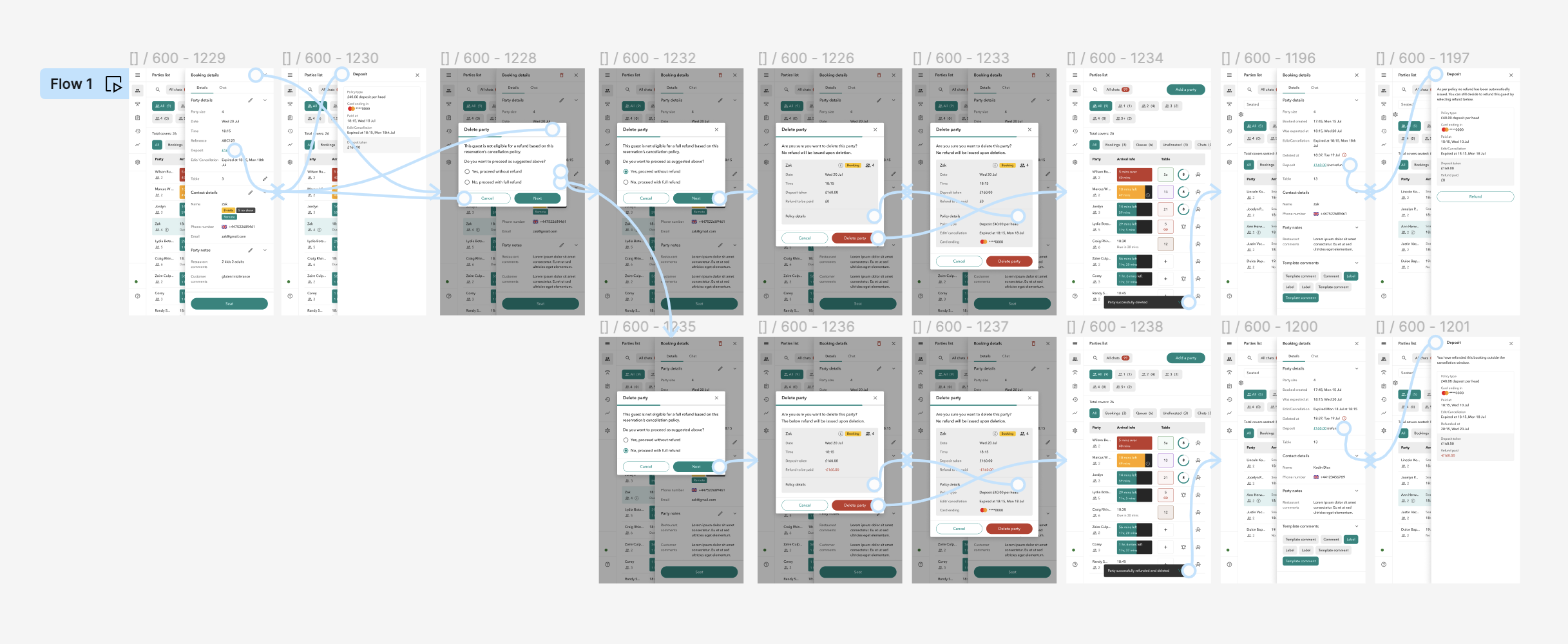
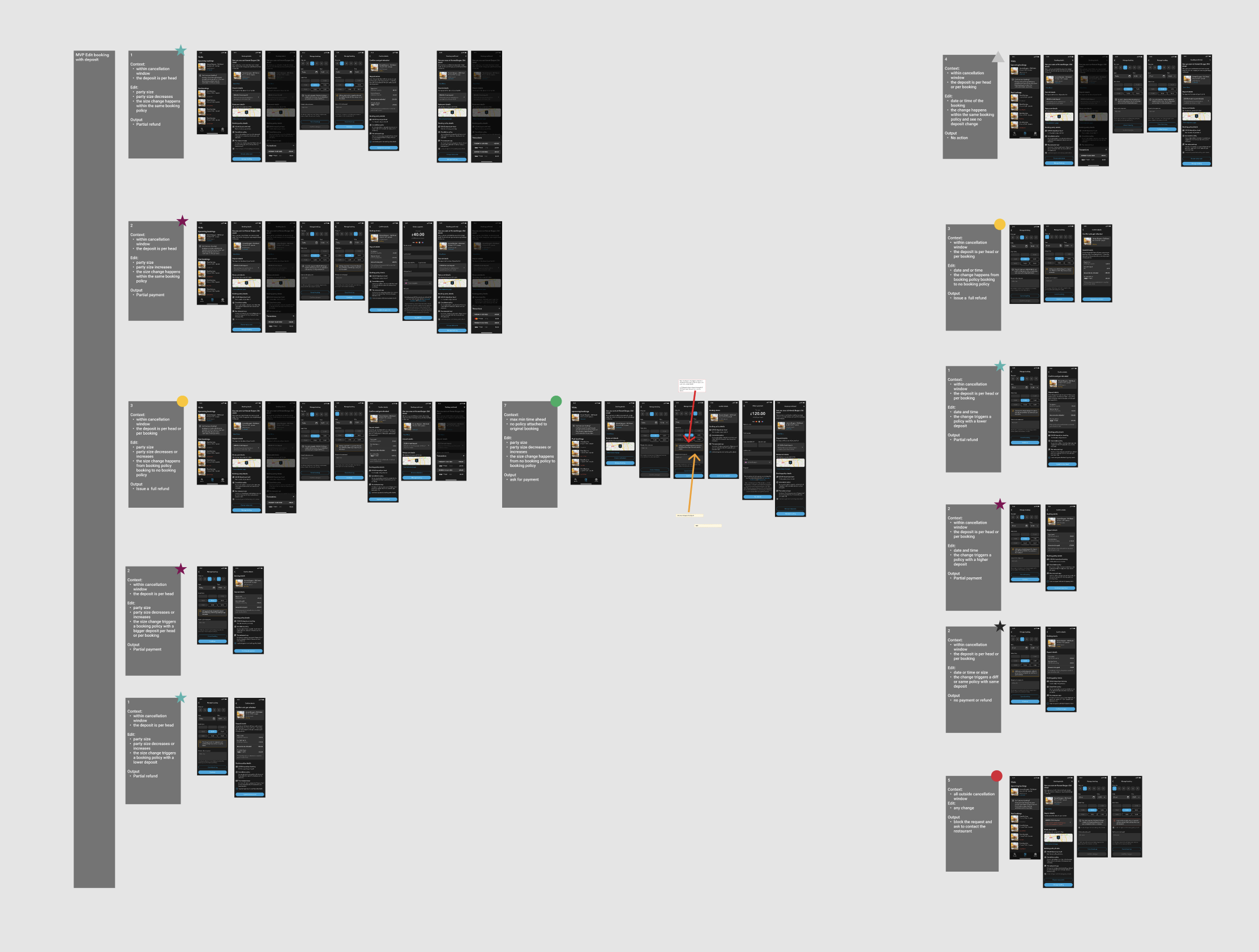
As obvious as it might sound, visualise the user journeys through diagrams is not just an exercise for product designers. It’s a great tool that really helped the 3 amigos to highlight possible blockers, prioritise for the MVP and uncover questions we didn’t think about. The most complicated paths to untangle were those related to “edit a booking”.
Tech considerations
Payments
Leverage the existing company products to take Deposits as an upfront payment.
Reconciliations
No EPOS integration means that reconciliation must be done manually by the host.
G Reserve
An integration with Google reserve has been flagged as a potential problem.
Ops considerations
Onboarding
To be perform as per existing Merchants onboarding process.
Underwriting
Manual process that will need to evolve into scalable and sustainable.
Charge limit
There should be a reasonable upper limit of what can be charged.
Priorities
I’m a big fan of the 3 (or 4!) amigos as a way of working. Have an expert representative of different fields when it comes to prioritise features and organise workload/timeline has always proved to be one of the most practical and fruitful step in the journey to finalise a well-rounded solution.
For P0, We decided to prioritise deposits. It was easier to achieve from a tech pov, with no dependencies with other part of the business and the flow of creation/deletion/editing were more straight forward. As per customers preference, deposit and card on file were both seen as an important step to prevent no-shows. For consumers, both policy types were seen as painful but depending on the case they would have agree upon either paying a deposit or give their card details.
Customers will be able to
- get in touch with our Ops team to ask for the deposit feature
- set up a policy, edit it, delete it and attach it to a schedule
- the policy set up will consist of an amount, a cancellation window and will be applied either per head or per booking
- the policy set up will auto-generate a legal message that will be displayed to the consumers and will also allow customers to add a personalised message
- create a booking with a policy automatically attached to it, depending on schedules
- delete a booking with a policy attached will trigger a full auto-refund or no refund depending if done within or outside the cancellation window
- edit a booking with a policy attached will trigger a full auto-refund, a partial auto-refund, manual refund or no refund depending if done within or outside the cancellation window and depending on the restaurant good will
- if a restaurant decide to issue a refund outside the cancellation window it will be done from the dojo for business app
Consumers will be able to
- book and pay for deposit from app and web
- see their booking and the transaction details
- cancel a booking with a deposit attached to it and get automatically refunded (within the cancellation window)
- cancel a booking with a deposit attached to it and get no refund (outside the cancellation window)
- edit a booking with a deposit attached to it and get either automatically fully or partially refunded (within the cancellation window)
- edit a booking with a deposit attached to it and get no refundt and/or pay another deposit (outside the cancellation window)
Policy set up
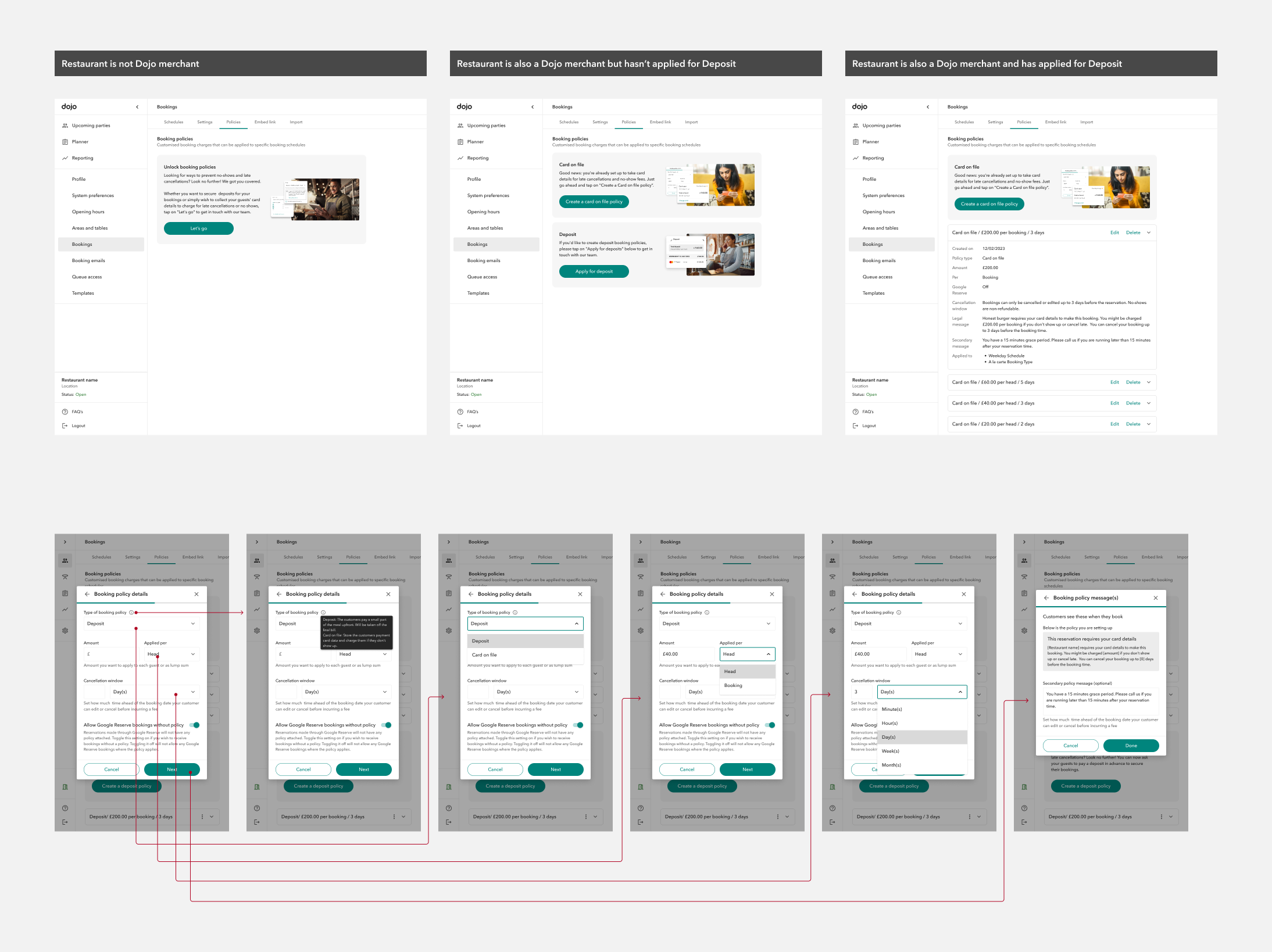
The onboarding to the “Booking policies” has slightly different journeys depending on 1) if you are already a Dojo merchant 2) if you have requested the deposit feature and 3) passed the underwriting process.
Policies & schedules
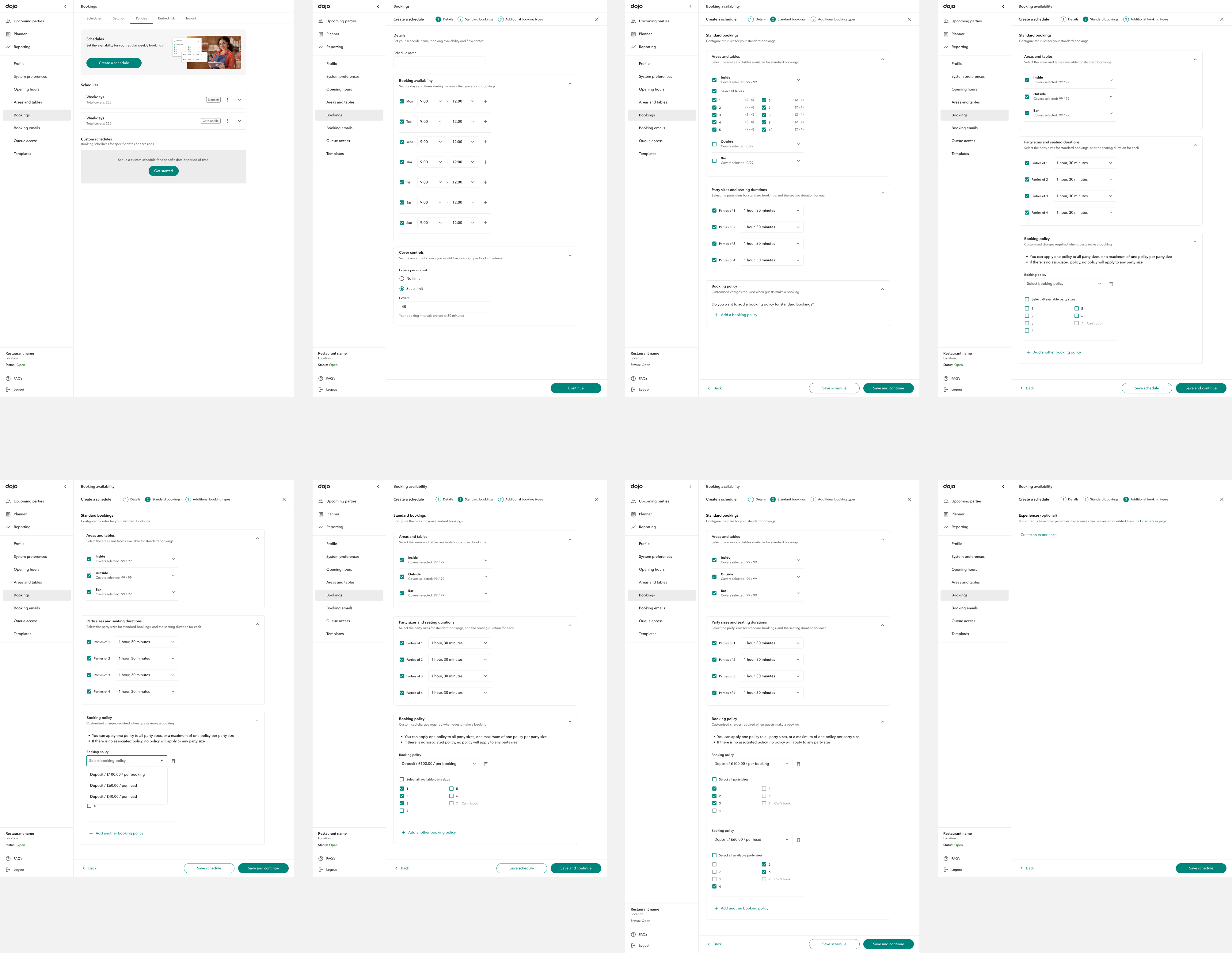
A lot of thinking has been put into understanding where “Booking policies” should have been placed within the existing product. Should have been a stand alone new feature, or be part of the existing settings? And if so, how would they integrate with the existing flow? Would they become a blocker for future features?
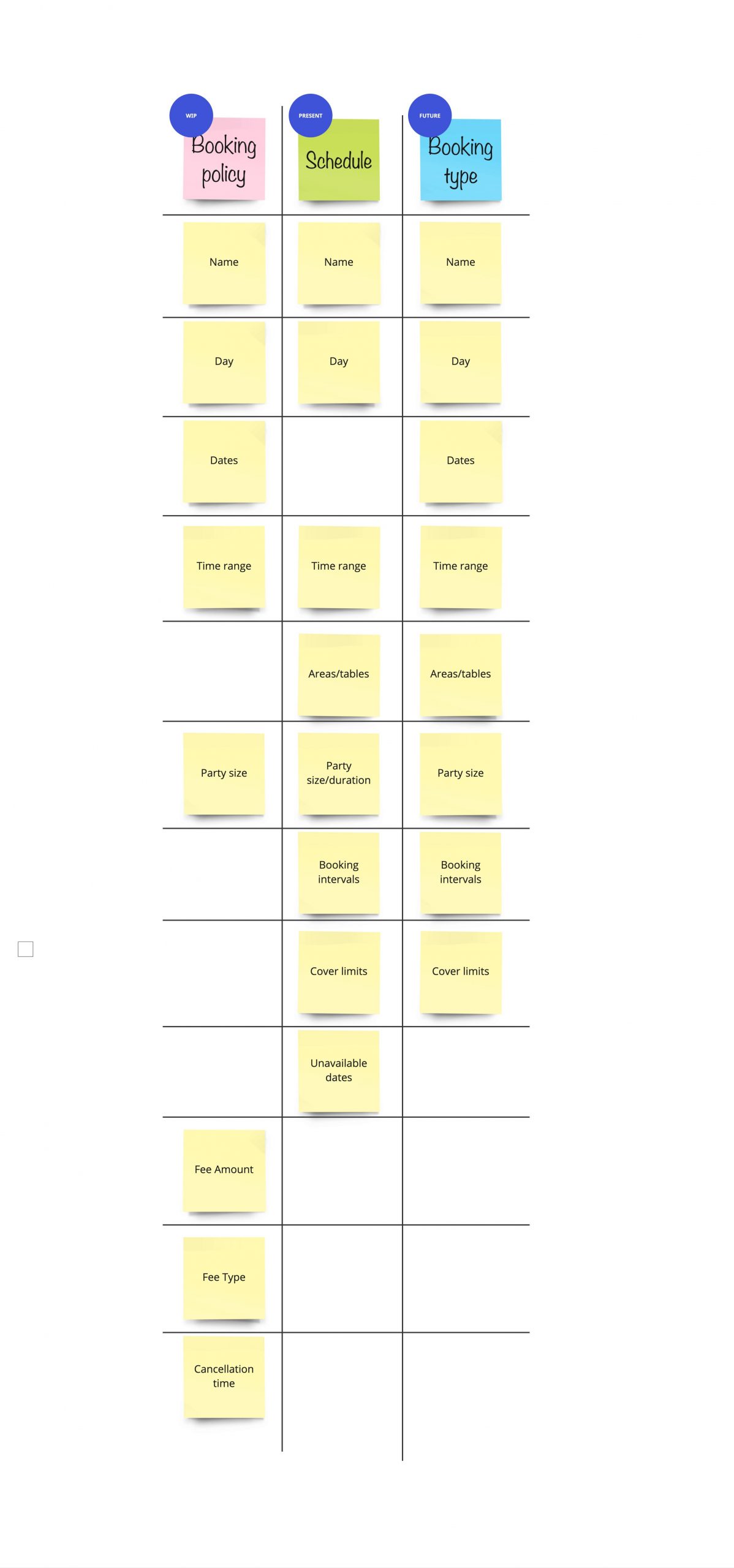
To organise my thoughts and start a conversation with the rest of the squad, I created a simple table to compare policies, schedules and experiences (previously known as ‘booking types”). The table listed what values were representative of each feature. What do they have in common and what not? The conclusion was that both policies and booking types should have belong within the schedule settings. This way, users had to insert the relevant information once and they all lived in one flow which would become handy during the schedules creation and any sort of editing.
Prototyping
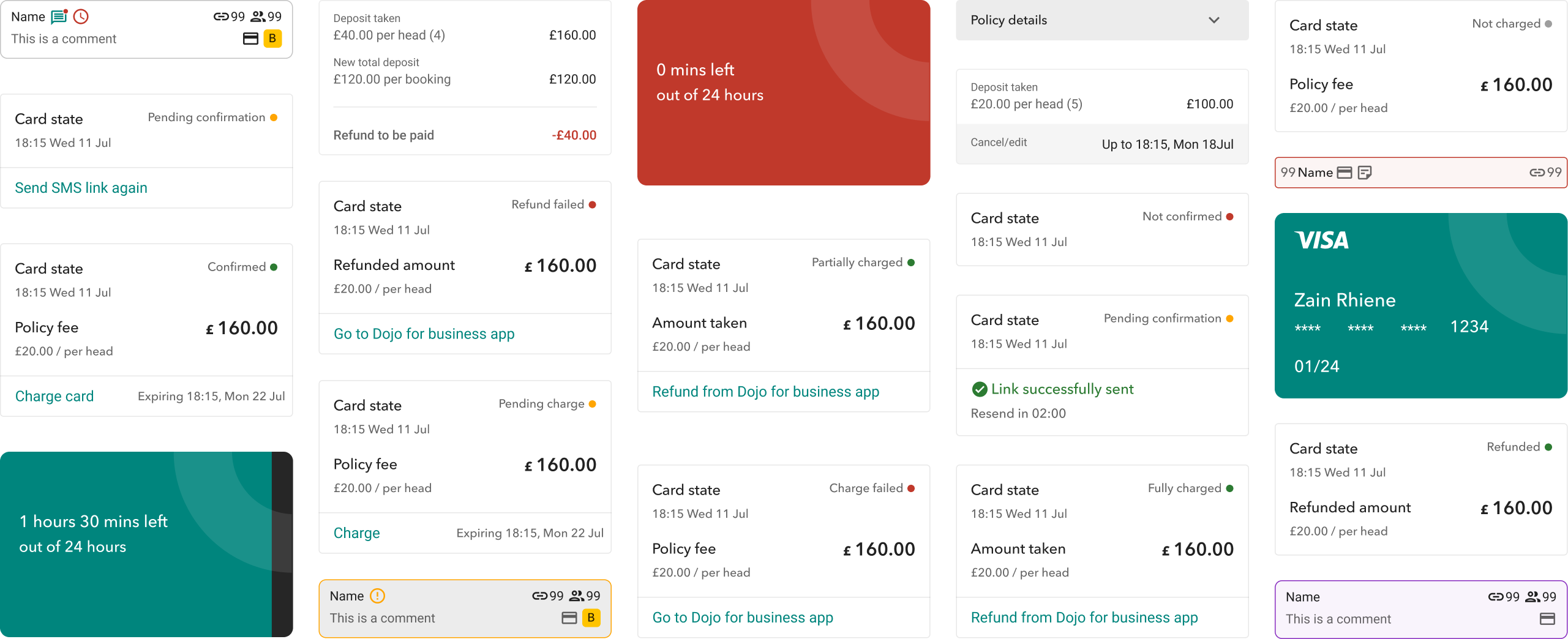
Once the journeys were set and the initial designs were in a good place, I prototyped few the different flows. I tested them with some of our current customers, to gain insights on the how intuitive and clear some of the key information and journey were.
New party states
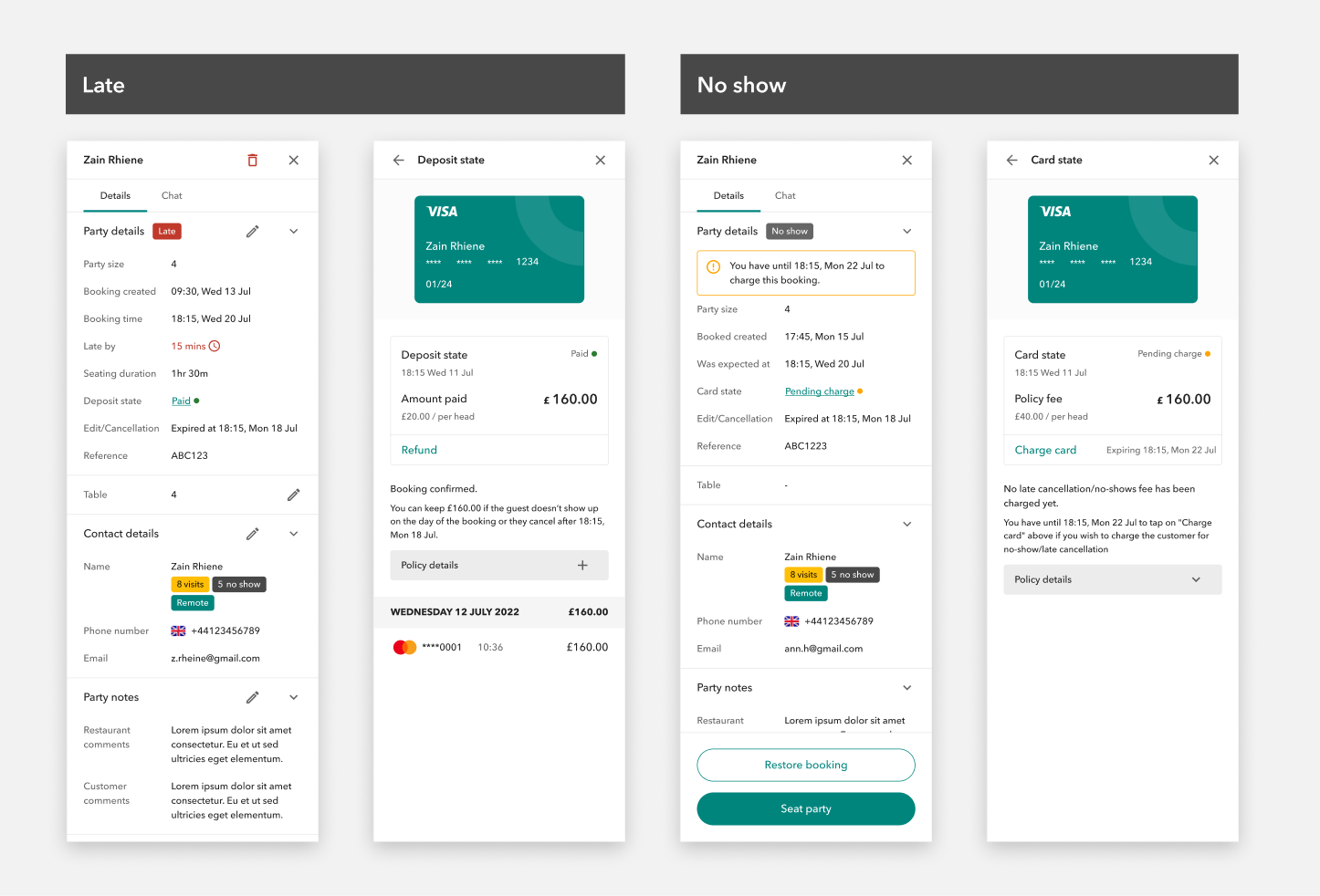
From the initial discovery and thanks to some early users feedback, it was clear that we needed to introduce two new party states: “late” and “no-show”.
Initially the “no-show” state was automatically applied to all parties that would not be “seated” 15 minutes* after their booking starting time. Since then, we realised that, because of the complexity of hospitality sector, we could not make such an important decision become 1)an automated action, 2) that was based on a standardised time. As much as the initial solution was tolerable as an MVP, we quickly iterated to bring flexibility to all kind of hospitality businesses.
A party would now automatically be labelled as “late” 1 minute after the booking starting time. At this point, customers would be able to tag the party manually as “no-show”.
This change also brought up closer to create the Card on file experience. This late cancellation/no-show policy (initially) was only applicable when a booking was either deleted or tagged as no-show.
*timeframe data to declare a party as “no-show” came from user research
Iterations
This project is still ongoing and started in January 2023. It went through a lot of iterations and more are yet to come.
After the P0 release, where deposit was the only available solution to mitigate no-show we worked on:
- booking reminders (SMS)
- card on file P1 (party editing not included)
- allow to attach any policy to any booking (P2) – for bookings outside schedules and enquiries (cross-squad work)
- deposit P3 (partial and full manual refund, from RMS) and card on file P3 (partial or full charge, from RMS)
- card on file P4 (party editing) – WIP
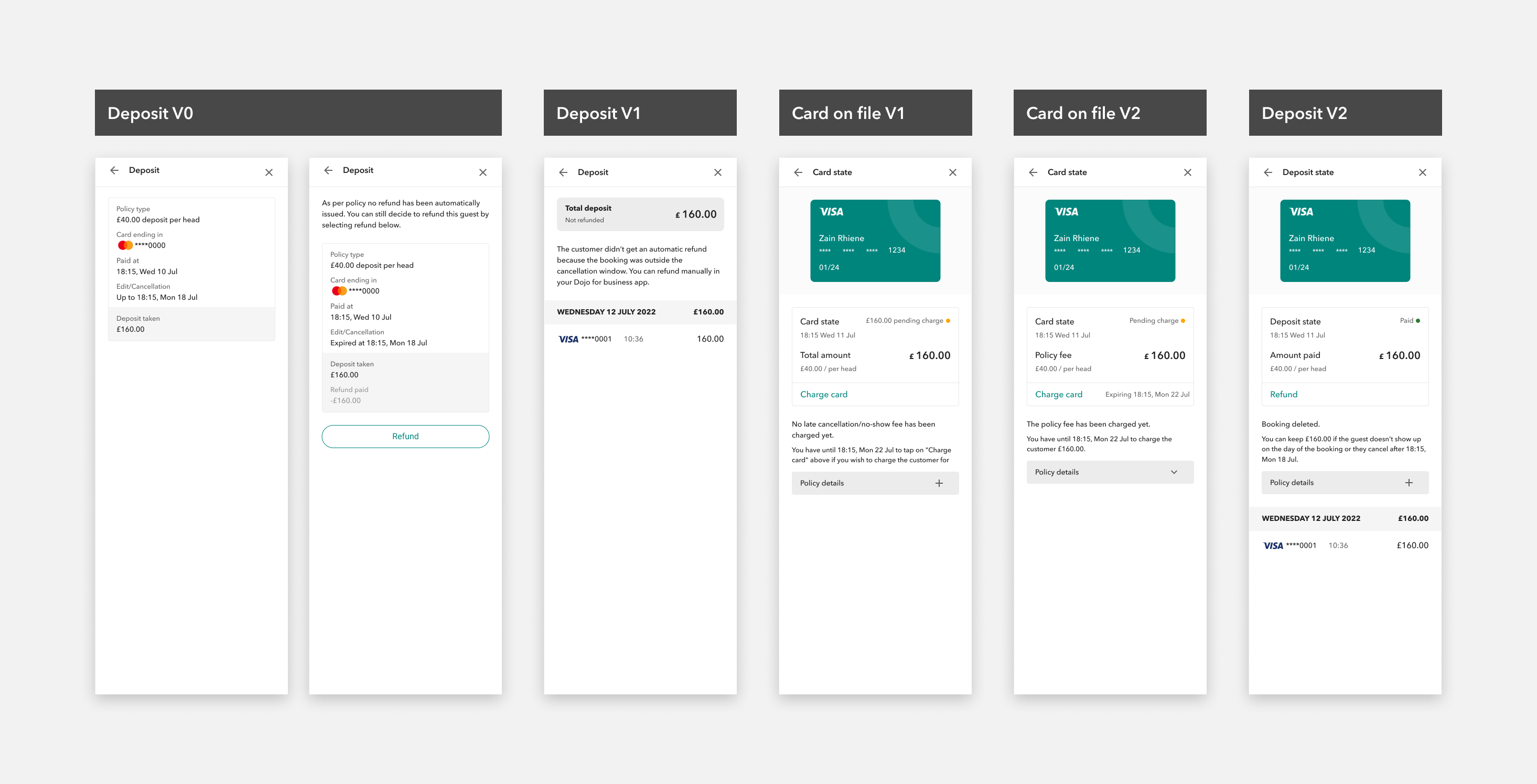
Consumers: booking creation
The consumer booking journey includes two different experiences: customers website and the Dojo native app.
This part of the project involved cross-squad alignment and collaboration with the Consumer Experience squad, which focuses on the native app only; with Payments tribe, at tech level for SDK integration.
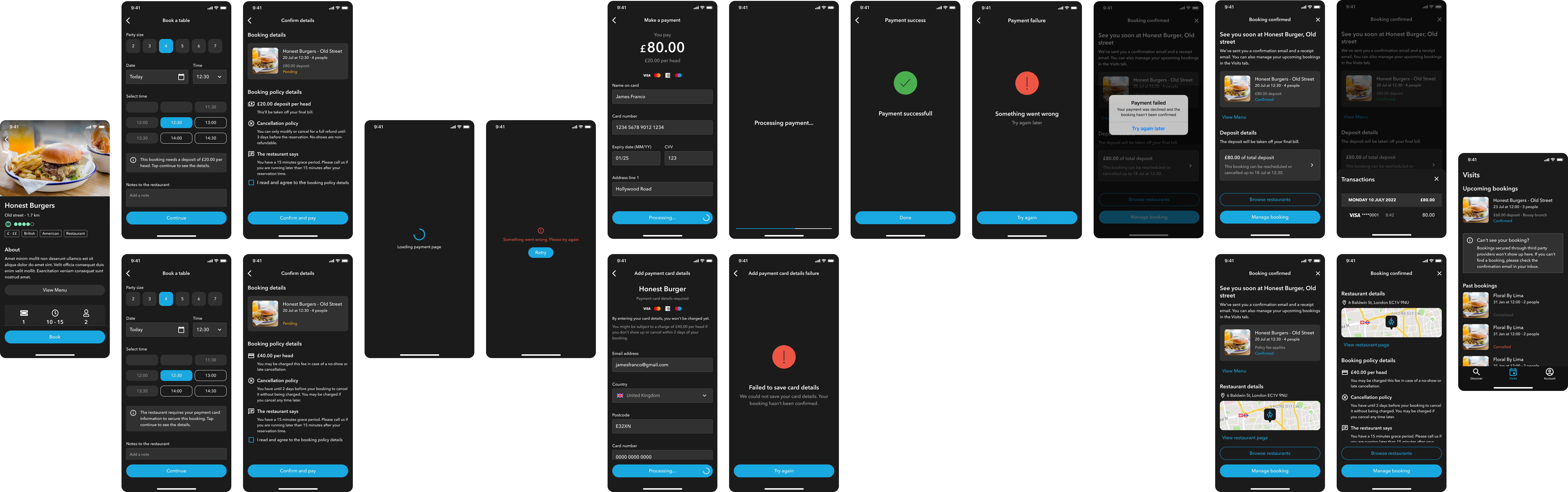
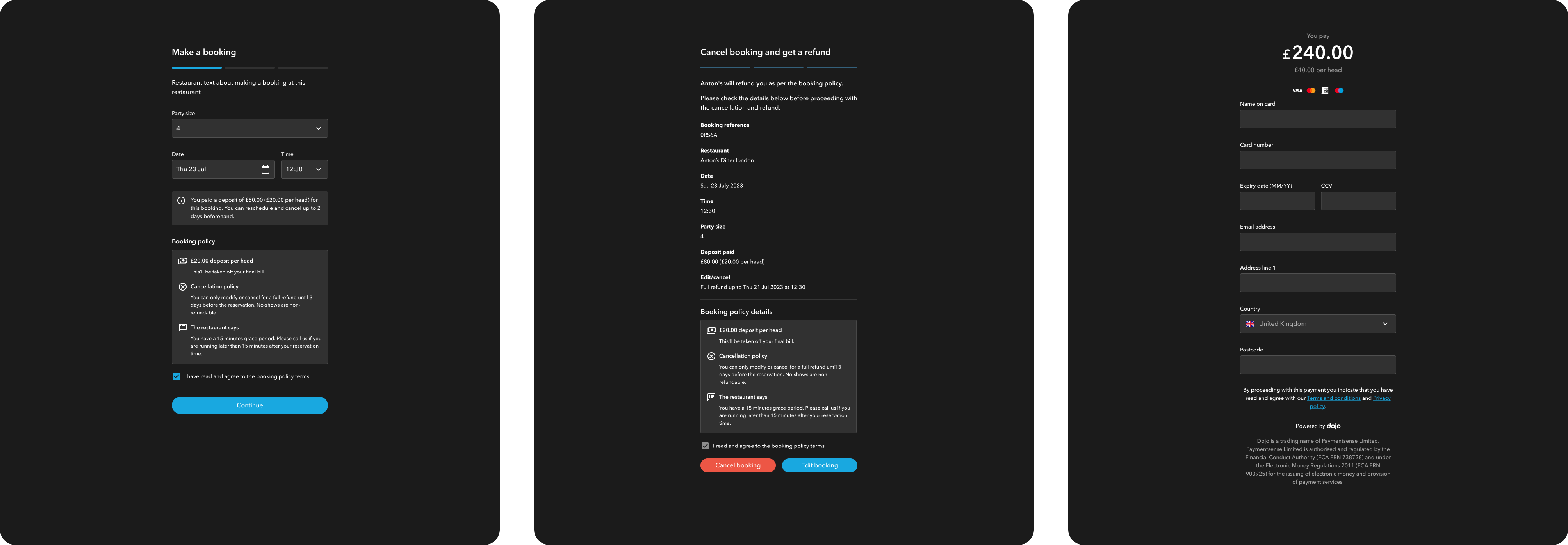
Consumers: booking management
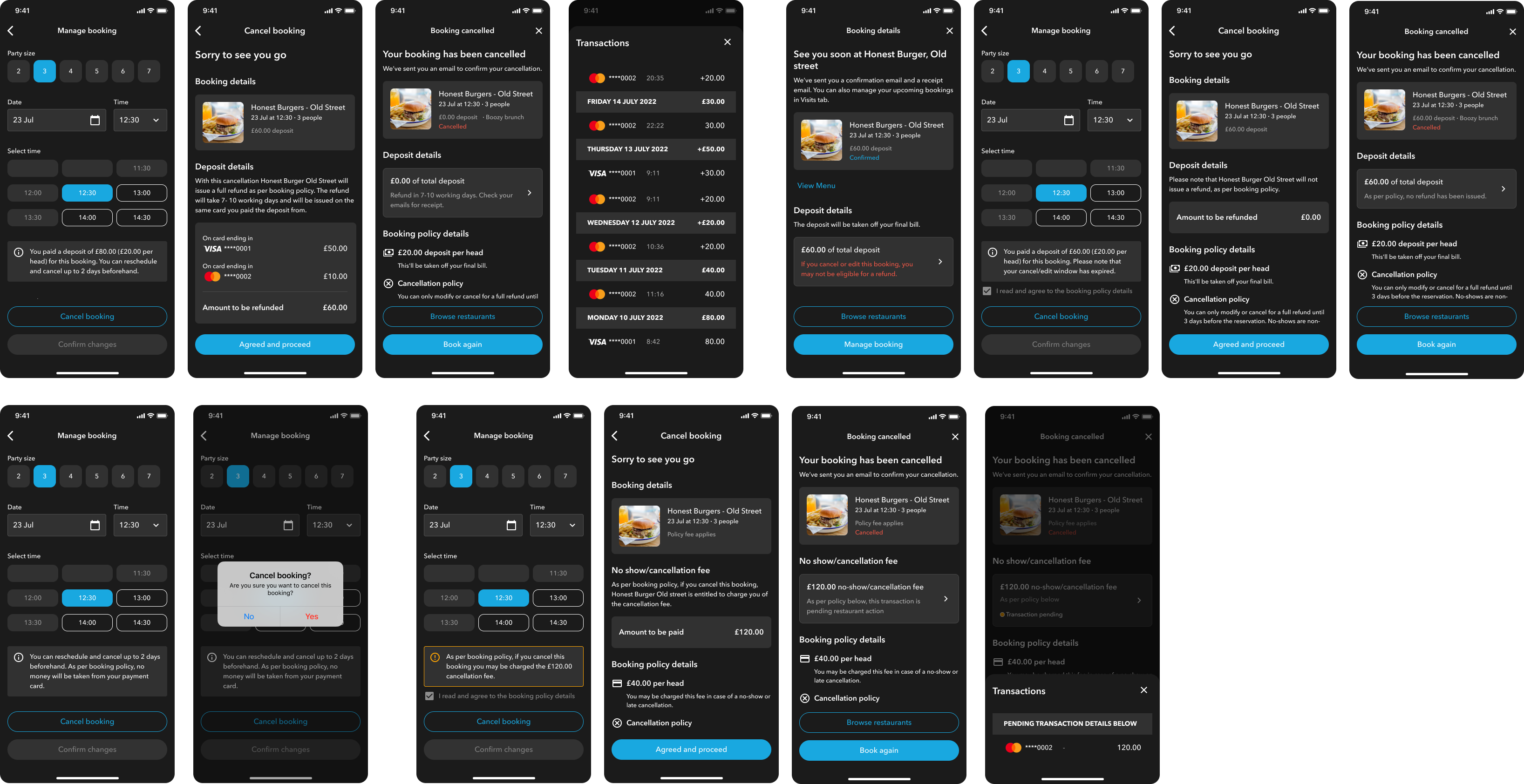
Booking management consists of two main actions: delete a booking and edit a booking.
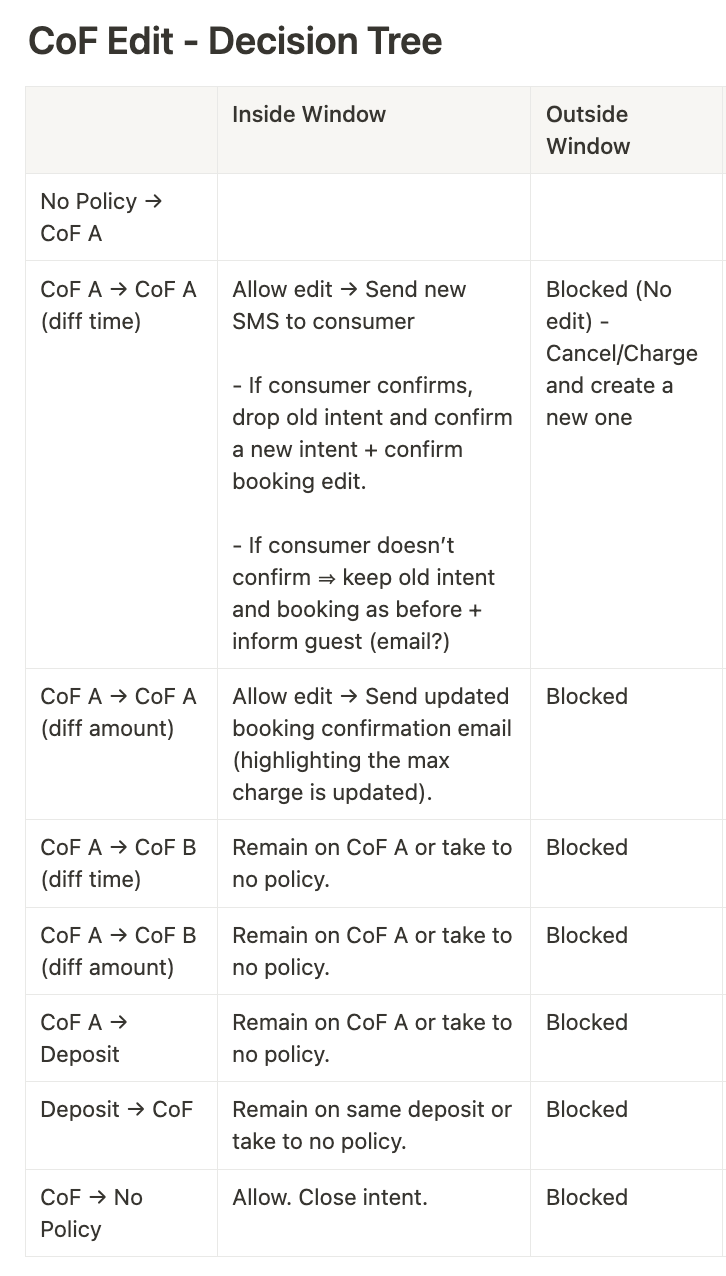
Each main actions presented a considerable number of variables to be considered:
- within/outside cancellation window (set up by the restaurants)
- party size increase/decrease
- change of date/time
One or more of the above could lead to either a change within the same policy or to a new policy, meaning:
- total deposit refund
- partial deposit refund
- new deposit payment
- policy fee payment
- policy fee increase
- policy fee decrease
Release
We decided to do a soft launch, by gradually releasing the feature to our customers.
With the help of our Ops team we listed 5 trusted customers that were onboarded F2F, one by one from July 2023.
Underwriting, financial crime, chargebacks and risk monitoring team were all involved in this first phase.
Results
This feature introduced the world of payments in the RMS for the very first time and since then our tribe has reviewed the way to measure success to include “customers arrived transaction”. This feature opens the door to a new set of services that we can now approach when looking at solving for our user needs.