Problem
Dojo had no floor plan at all: no setup tool, no Front of House view, which contributed churn and in-service frustration. SevenRooms had one, but only on iPad, which broke the onboarding.
Solution
I created both: 0→1 at Dojo (setup + FOH), and web parity at SevenRooms to unblock onboarding.
Impact & Results
Stack
Figma · FigJam · usertesting.com · Looker · Miro · Notion
Context
I've shipped floor plan features at two companies. Not the same feature twice: one was zero-to-one at Dojo (grew to 89 active locations with week-on-week growth in seated parties), the other was extending an established SevenRooms product (Floor Editor on Web, internal-team validated before beta rollout). What carried between them wasn't reusable screens. What carried over was my own understanding of the problem space, the user behaviour patterns I'd observed, and the design principles I'd developed.
What is a floor plan?
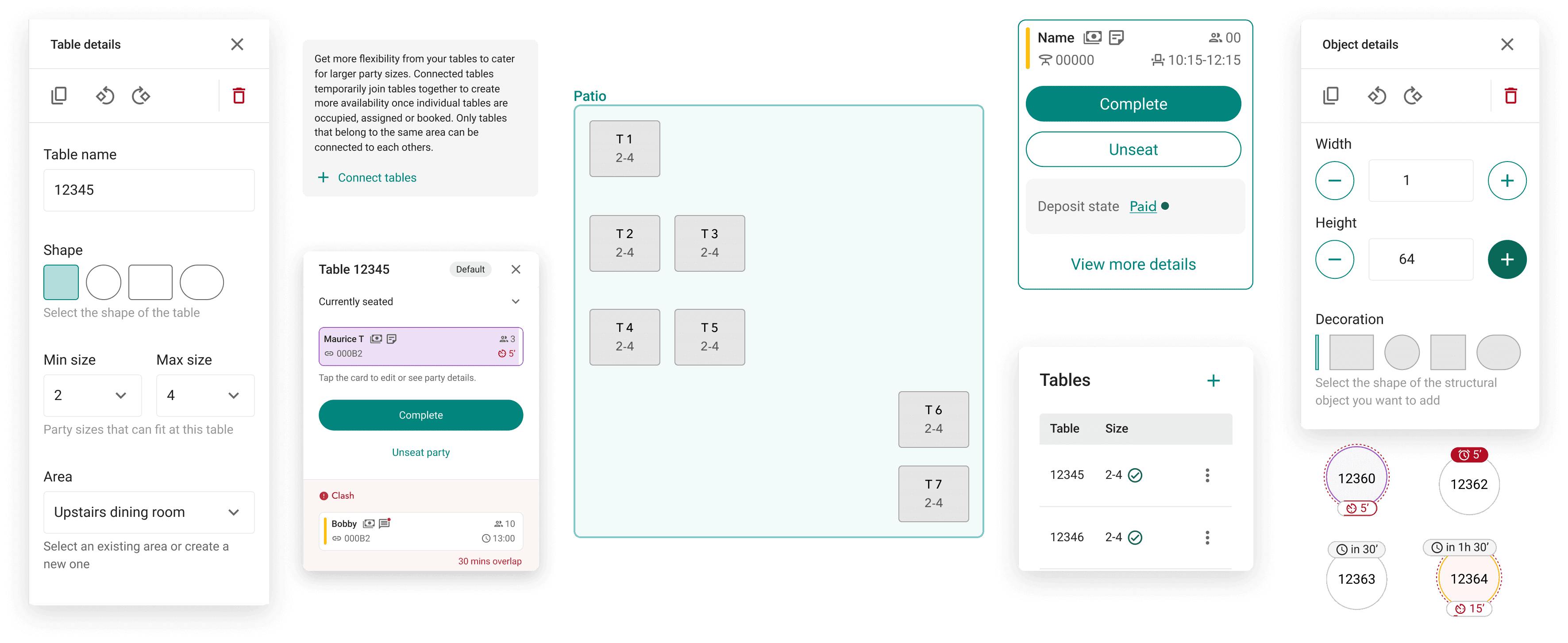
A floor plan in a restaurant management system does three jobs at once: it's a setup tool, a service tool, and a training tool.
A three-jobs problem
A floor plan lives across two sides of the product: the Back of House, where it's configured, and the Front of House, where it's used during service. Across those surfaces, it's doing three things at once:
The three jobs want different things from the interface: setup prioritises precision and completeness; service prioritises speed and clarity; training benefits from both, but with lower stakes than either.
The discipline is treating setup and service as near-separate products that share a data model.
Set up tool
Managers build a digital representation of their physical space (tables, areas, sections, seating configurations). Happens once (or infrequently) and needs to be accurate.
Service tool
What's configured in the Back of House surfaces in the Front of House as a separate page, as a live service view. Hosts and managers use it to see what's happening at a glance: which tables are seated, which are turning, which have unassigned bookings. Has to be fast and reliable under pressure.
Training tool
New staff learn the venue layout through the floor plan, where tables are, how sections are divided, how to read the system quickly.
Before anything got designed at Dojo, I ran competitor restaurant site by visiting three London restaurants using competitor RMS platforms. I was looking for: how do they actually use floor plans during service? How often do they edit them? What fails under pressure?
Two years later at SevenRooms, the research wasn't re-run — the domain was familiar and the scope was narrower (web parity for an existing mobile tool). What I'd learned at Dojo carried over as a set of pre-loaded questions.
In-service tool
FOH floor plans are used primarily during live service by hosts and managers not as a planning tool for future bookings.
Representation matters
Layout helpers (lines, shapes, room dividers) matter: the visual structure helps orient staff even when tables look similar.
UX expectations
Drag-and-drop table assignment is the expected interaction model: list-based assignment felt clunky in comparison.
JOB 1
Setup
At Dojo
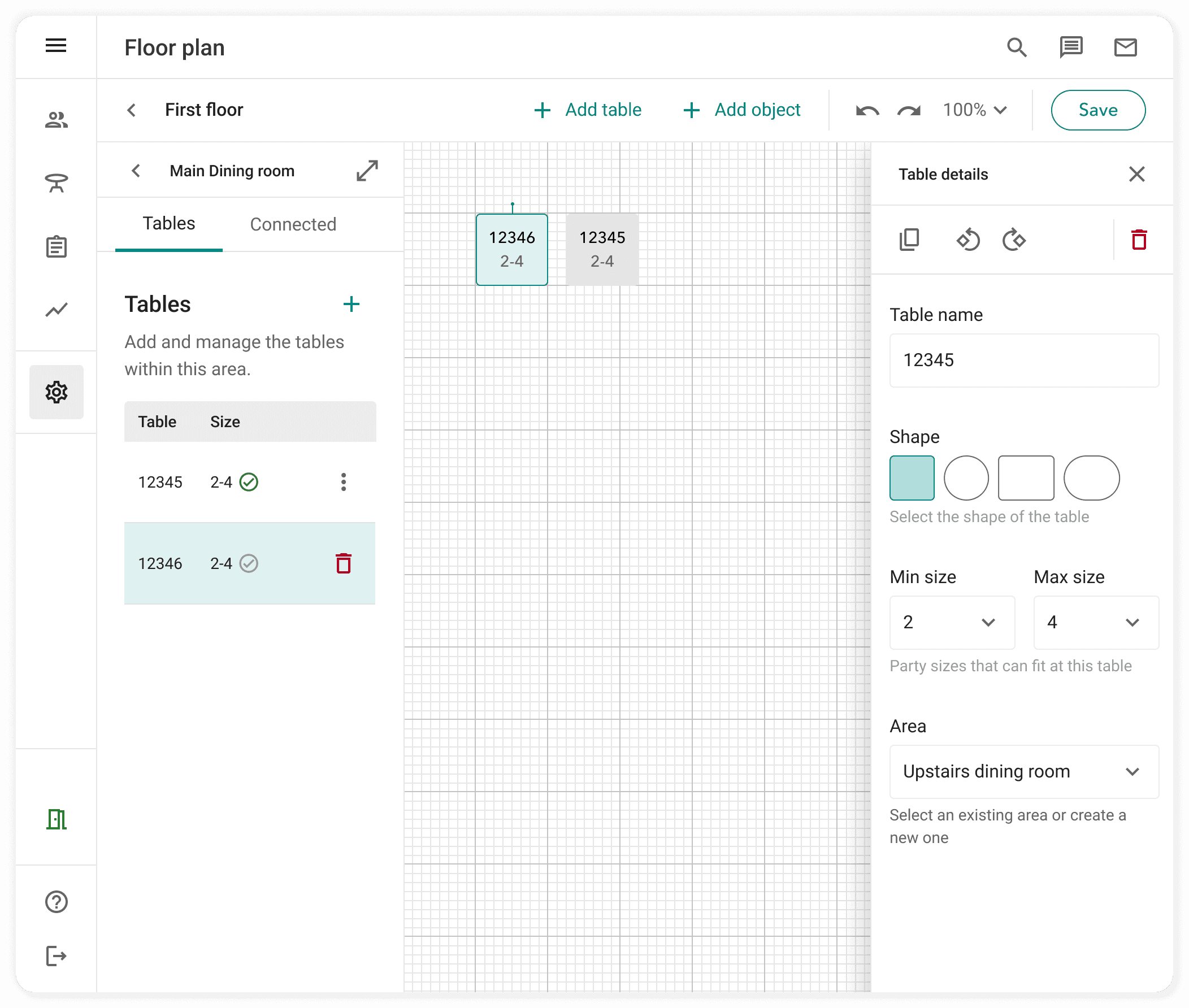
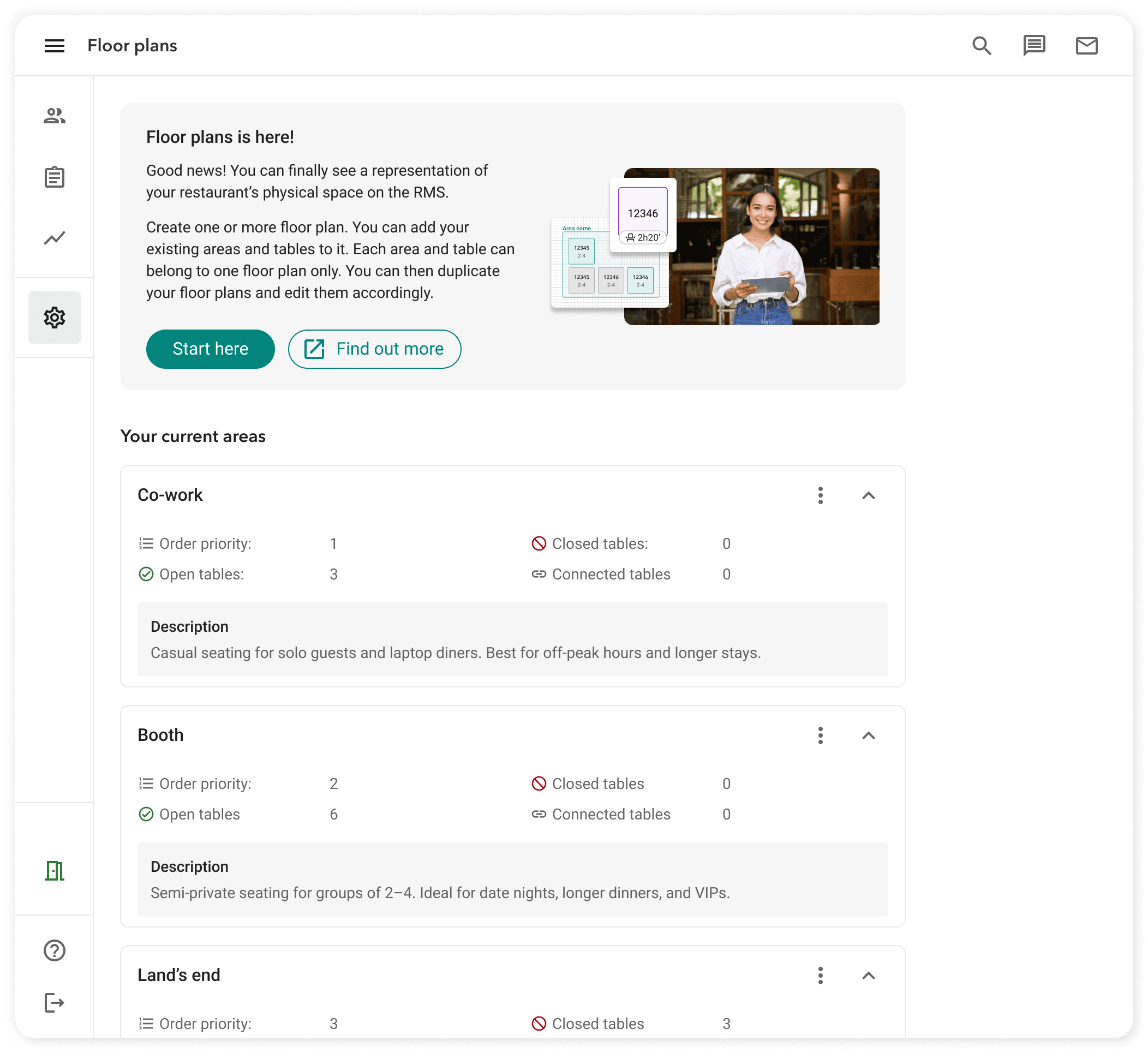
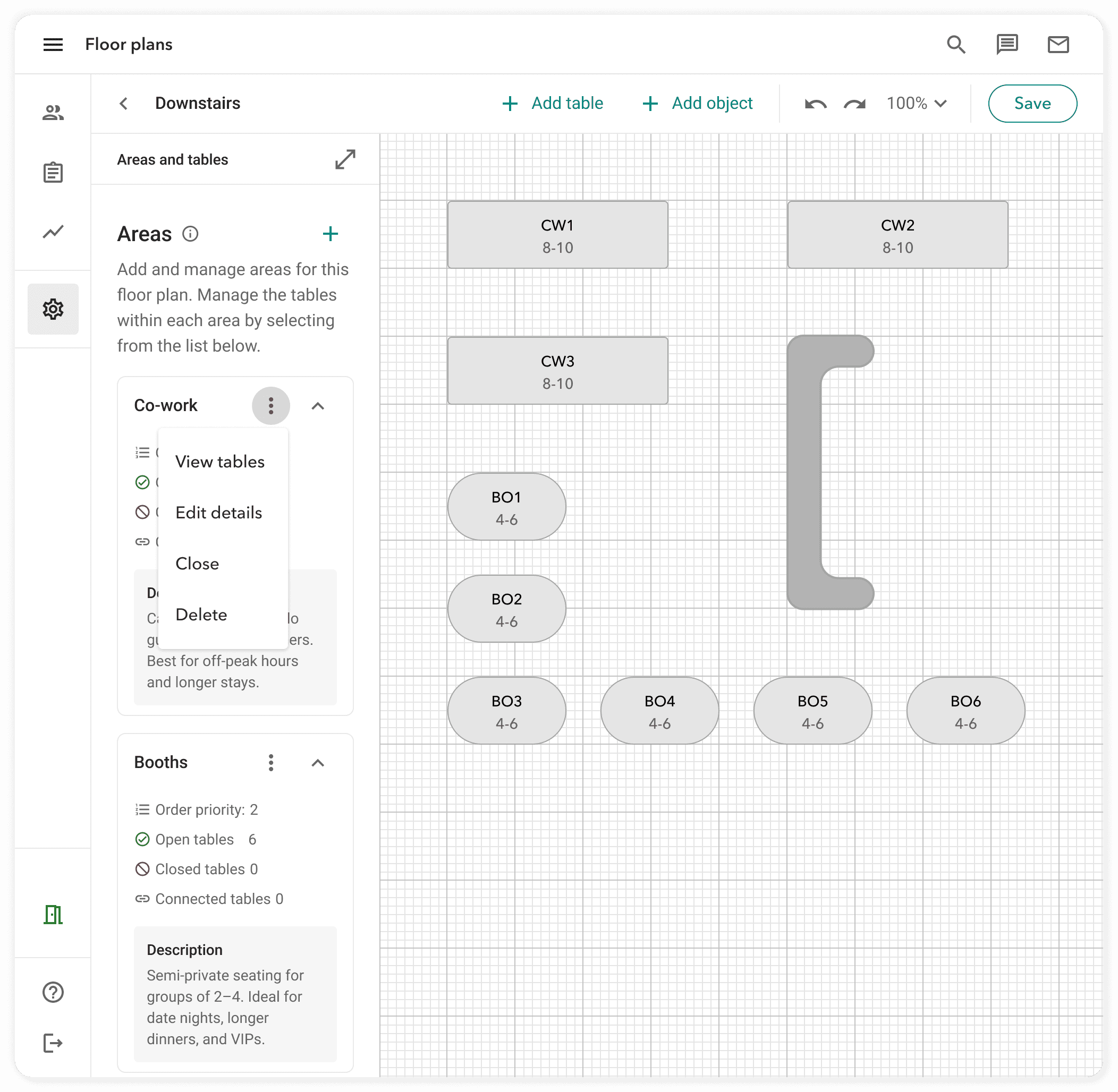
I designed the Settings editor from zero. Managers added tables, defined areas, set table capacities, and configured which tables were bookable online vs. walk-in only. A critical success metric for the pilot was self-service rate: could venues configure their own floor plans without Dojo support? I designed the editor for step-by-step area creation, sensible defaults for table dimensions, and enough in-product guidance to handle the edge cases.
Before
Creation
After
Floor plan
Areas
Tables
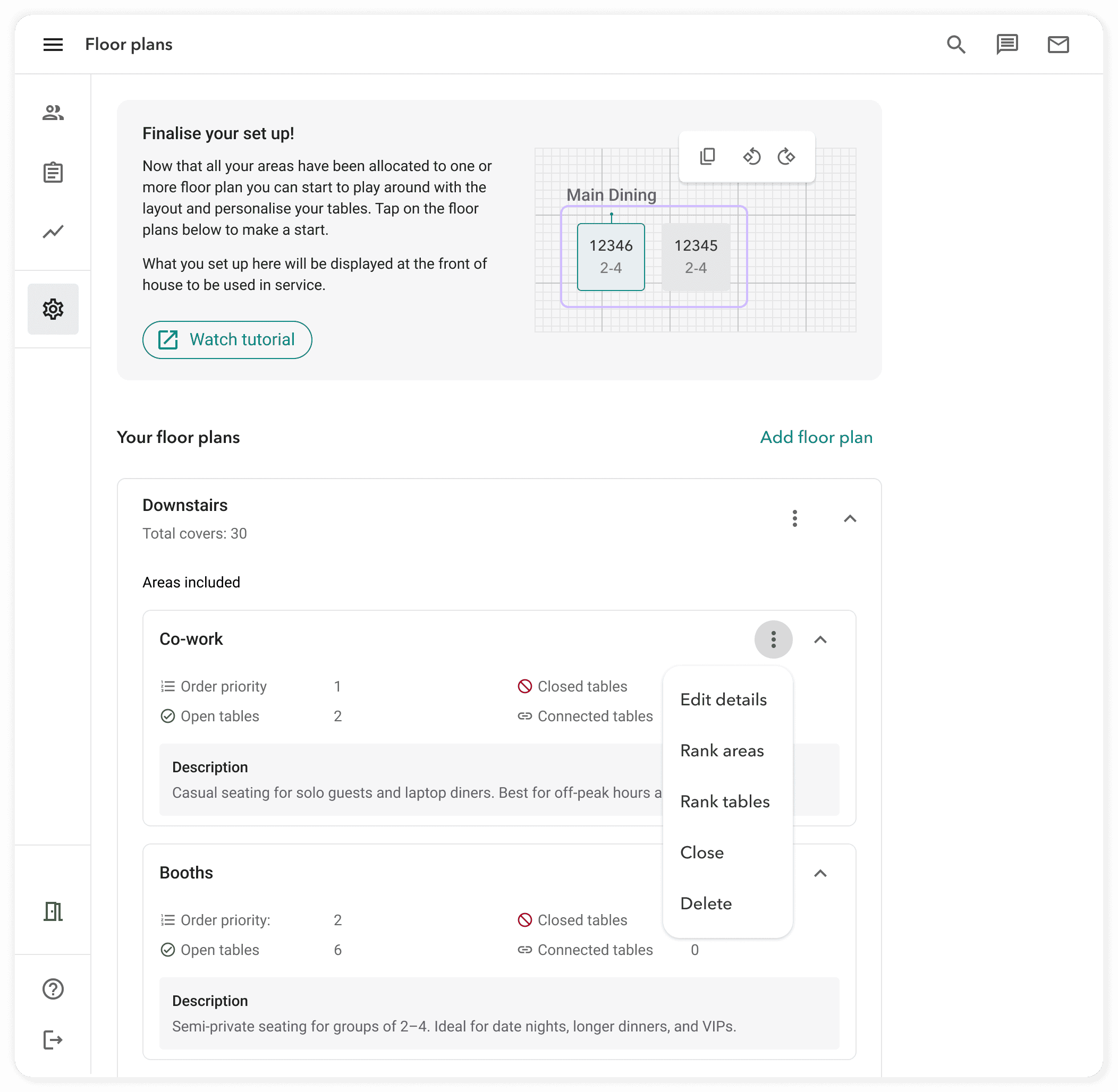
Areas
Tables
At SevenRooms
The Floor Editor existed, but it was mobile and iPad only. New venues onboarding had to use an iPad to configure their space before they could go live which was a meaningful friction point, particularly for venues that didn't have an iPad on hand during setup.
My work
bring the Floor Editor to web with full parity where technically feasible, adapting interactions that were inherently touch-based (drag-and-drop table placement, pinch-to-zoom) to pointer-and-keyboard equivalents.
This was more complex than a straight port. The iPad editor had interaction models that assumed touch — drag handles, tap targets, gesture-based rotation. On web, I redesigned the interaction model around precision (pointer-based positioning, explicit rotation controls, keyboard shortcuts for power users) while preserving the same underlying capabilities.
I also used this as an opportunity to define reusable patterns: the Floor Editor on Web became the foundation for a consistent interaction language across venue setup screens, not just this one feature.
Pre-beta testing with the internal onboarding team
Before opening the Floor Editor on Web to beta customers, I ran usability testing with the internal onboarding team, who knew the tool inside out from years of setting up venue floorplans manually. Two refinements came directly out of their feedback:
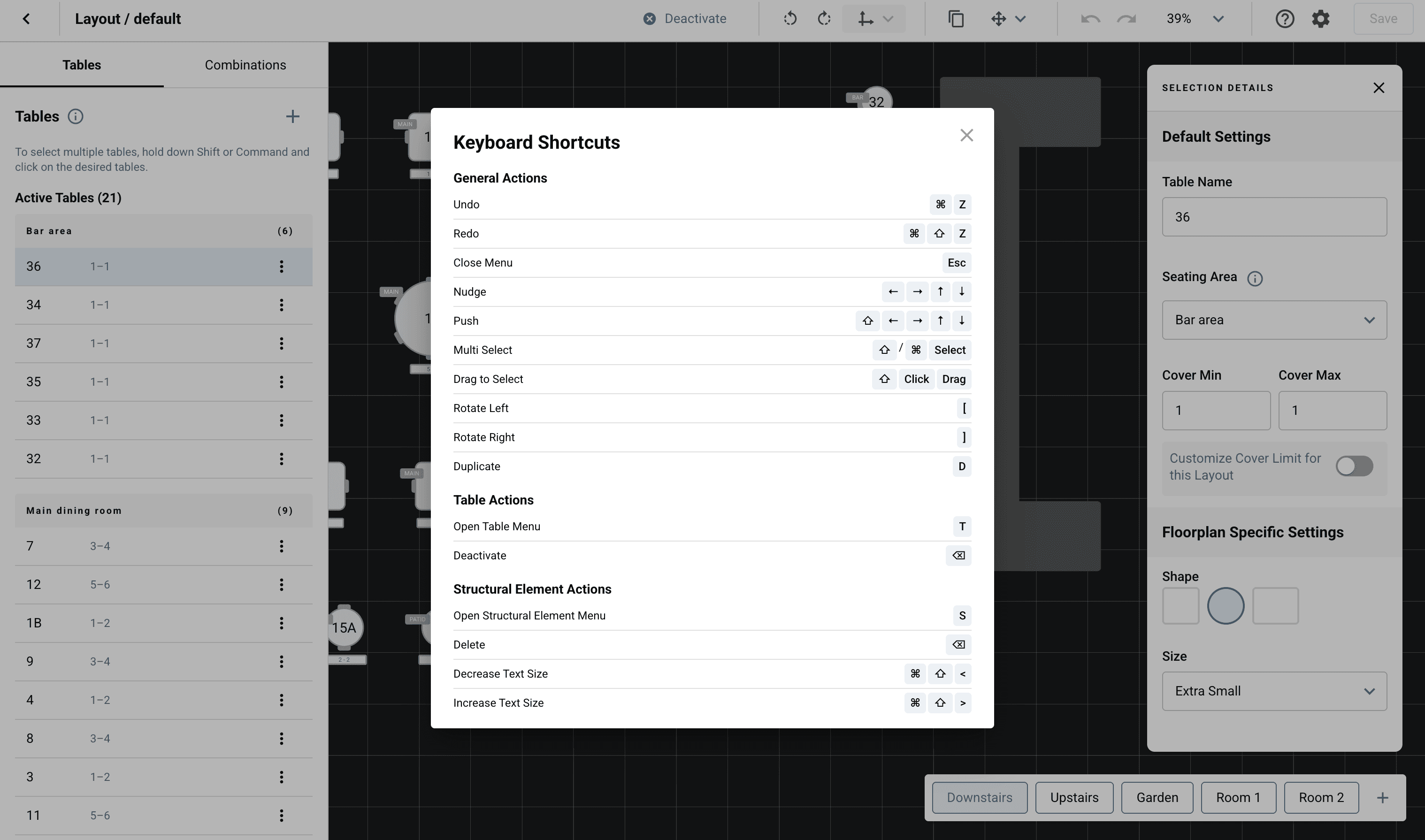
- Increased background contrast, so grid lines and table edges stayed visible at the zoom levels the team actually worked at.
- Added a `?` keyboard shortcut that surfaces a shortcuts overlay on demand — addressing a learnability gap without cluttering the canvas.
The principle that carried across both ships
Sensible defaults make the difference between a venue completing setup on their own and bouncing to CS. Every decision had to either hold the user's hand through the common path, or get out of the way when they knew what they wanted.
JOB 2
Service
At Dojo
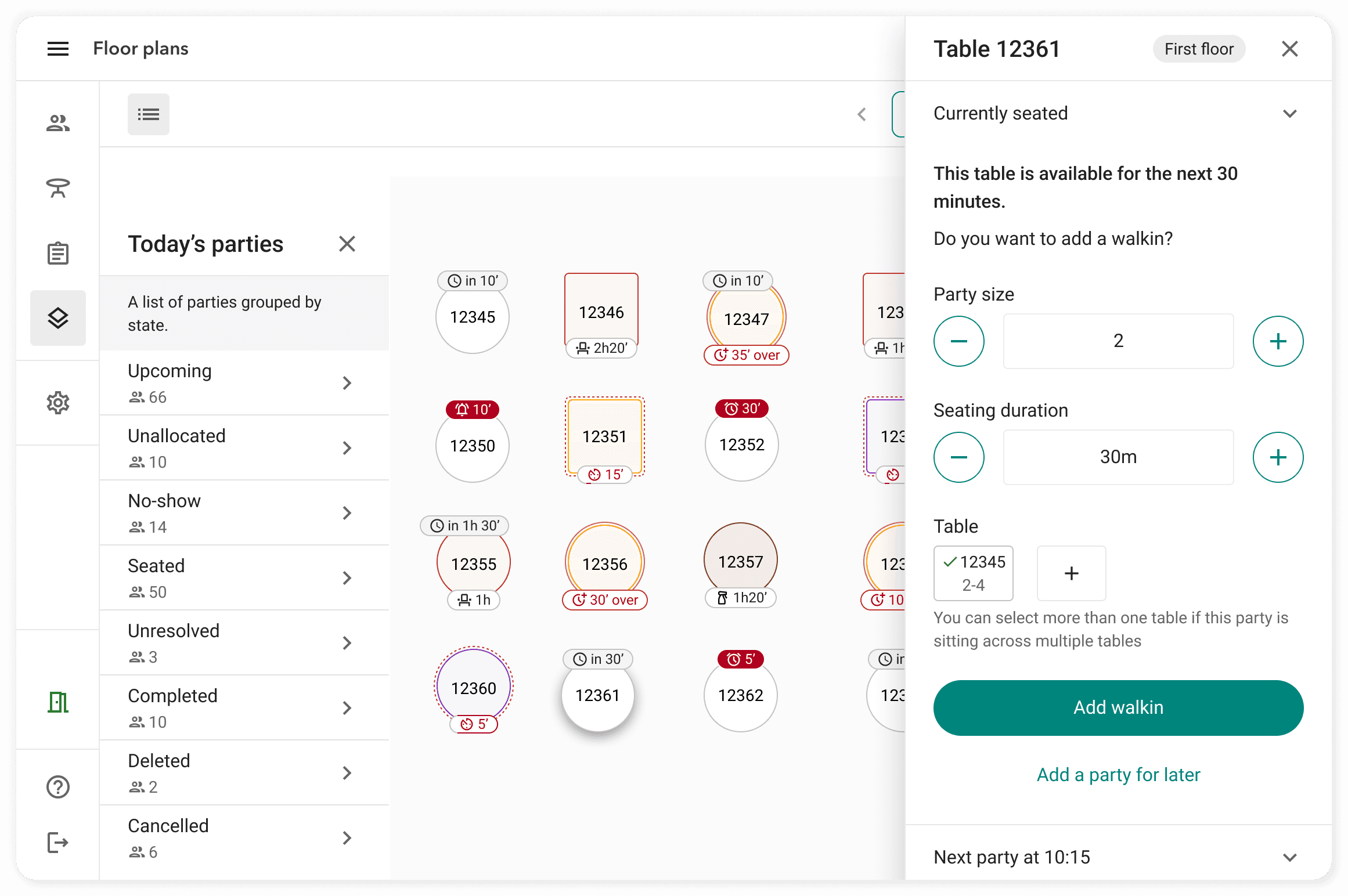
The Front of House (FOH) live service view was built from scratch. Tables shown in their physical layout, each displaying state (available, seated, upcoming booking). Hosts could drag-and-drop to seat parties, tap tables for quick actions, and see the shape of service at a glance.
Three design decisions did most of the work:
Spatial accuracy vs. operational clarity
A floor plan that perfectly mirrors the physical room can create a cluttered interface during service. I prioritised operational clarity enough spatial cues to orient staff quickly, without overwhelming the view with information that doesn't change how you run service.
Area navigation
Restaurants often have multiple distinct areas (main dining room, bar, terrace, private dining). Rather than showing everything at once, I designed tabbed area navigation — letting hosts switch context between areas quickly without losing orientation within each.
Table states as the primary signal
Colour-coding table states (available, seated, turning, upcoming) was the single most important decision in the FOH design. I tested multiple palettes and state sets to find the minimum set that covered real service scenarios without creating ambiguity.
Pilot
Two-week pilot with 5–8 customers: busy London restaurants with a mix of bookings and walk-ins, multiple areas, and at least one team member who'd requested the feature. I specified the pilot criteria, coordinated customer selection with the PM, and tracked success against predefined criteria: setup speed, self-service rate, FOH usability during live service.
Outcome
Grew to 89 active locations with week-on-week growth in seated parties. Self-service setup rate met the pilot success threshold. The feature became the primary table management view for active locations during service.
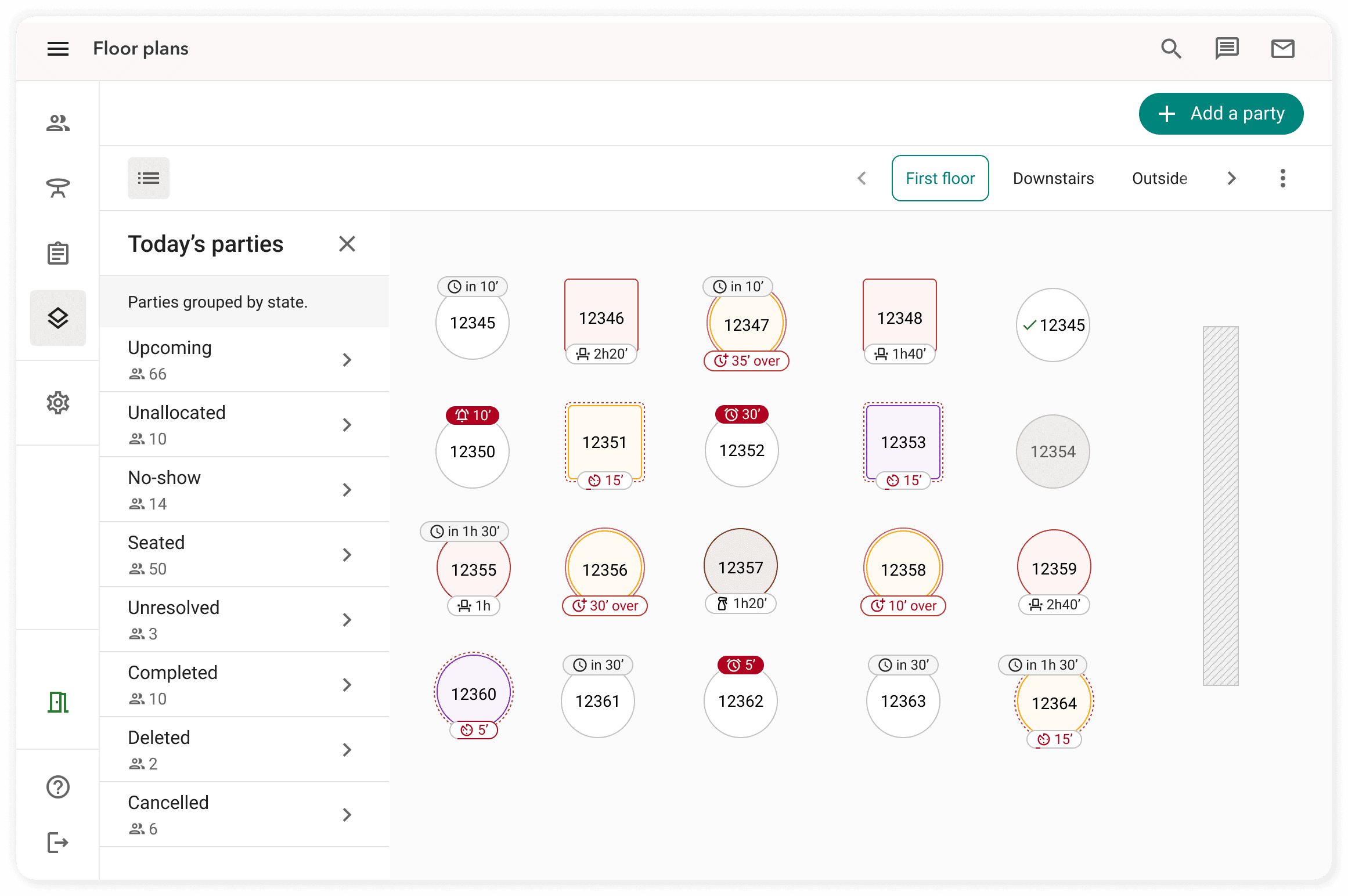
Seated
No-Shows
Upcoming
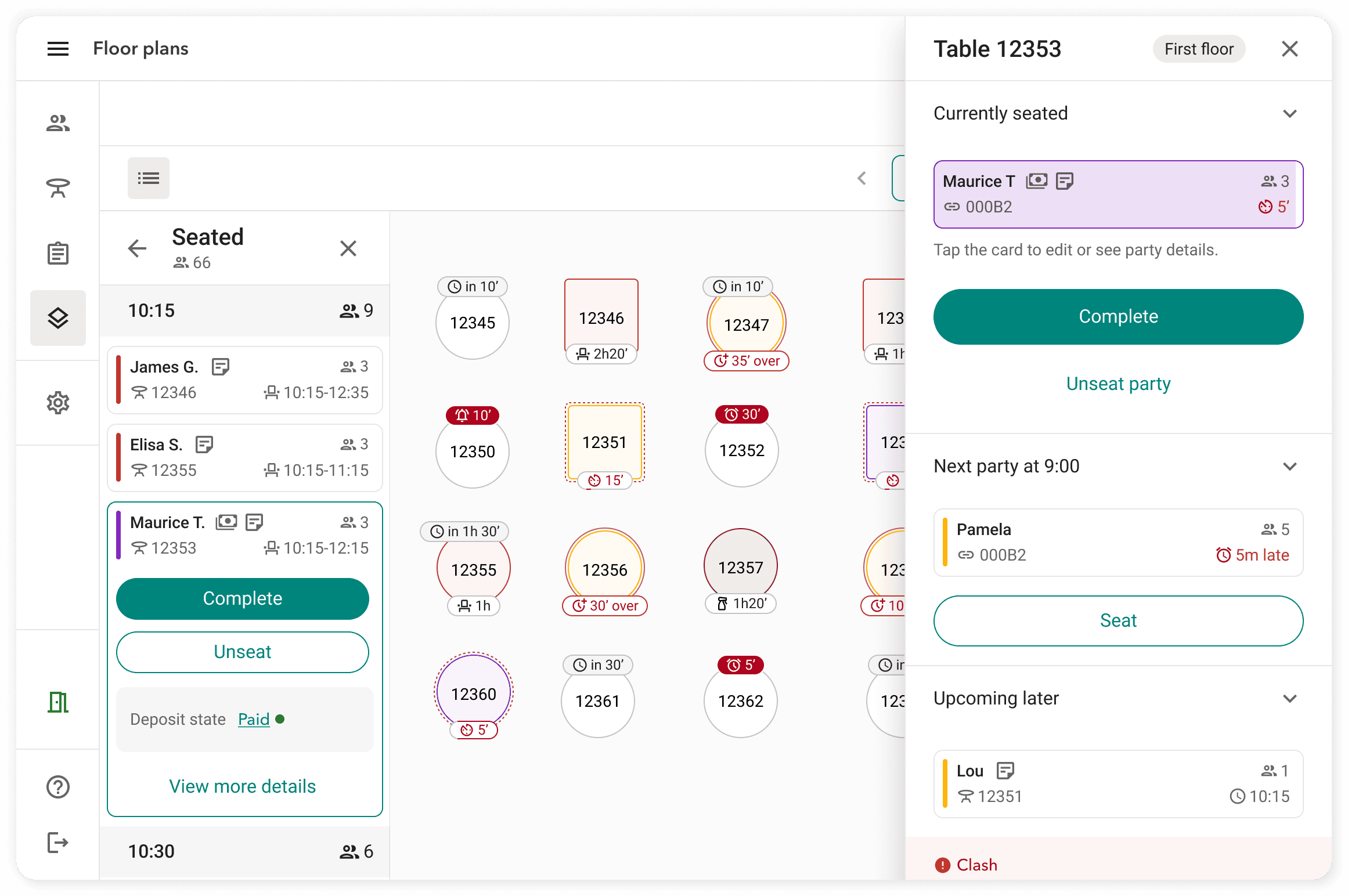
At SevenRooms
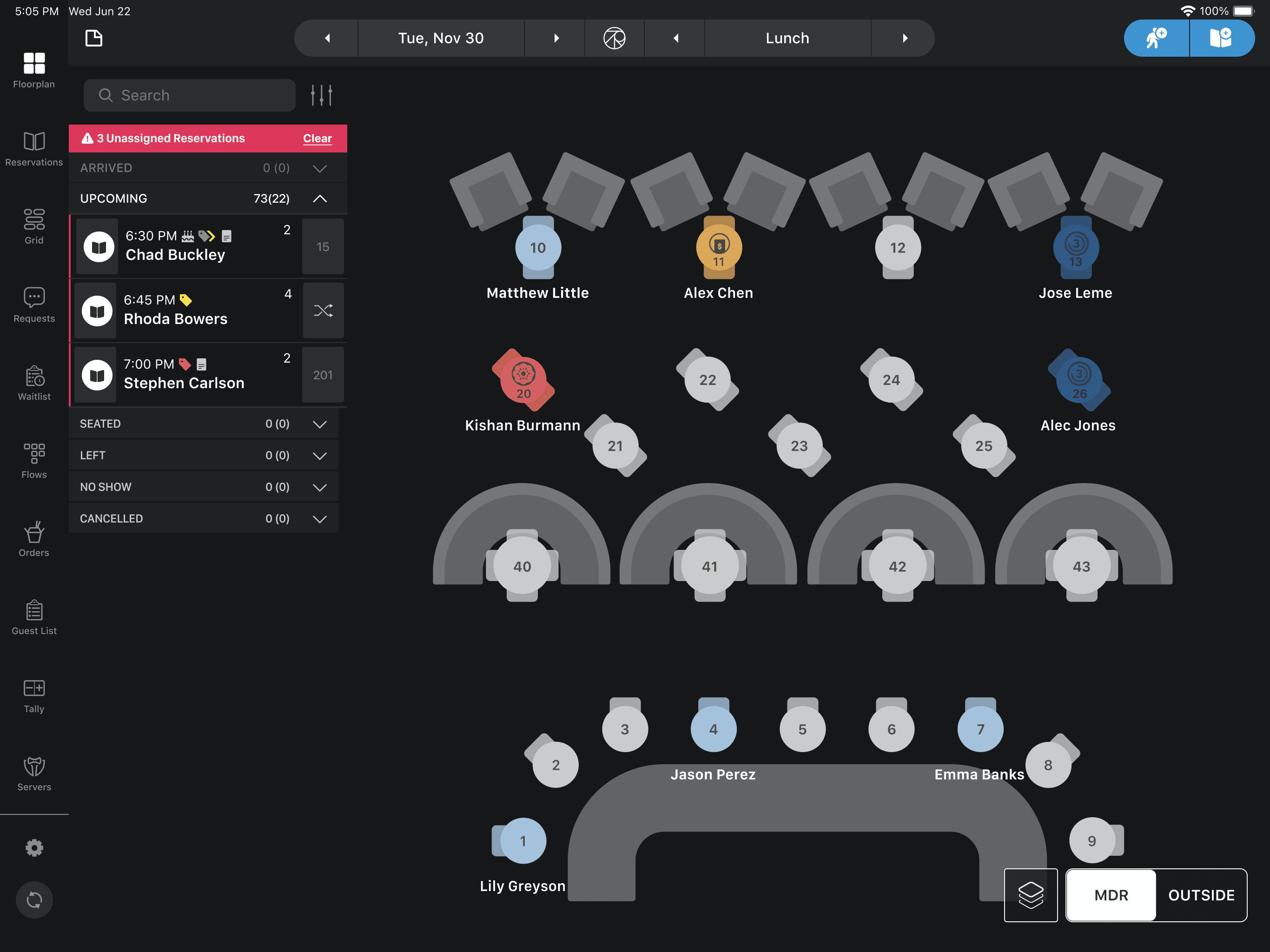
The FOH floor plan was already a primary, well-established, deeply integrated service tool for venues and venues groups. My contribution to service was through surfacing Unassigned Reservation, that surfaced bookings without a table, so hosts weren't blindsided during live service.
The principle that carried across both ships
Service mode is a different cognitive context. Hosts are managing multiple threads simultaneously like seating parties, handling walk-ins, managing staff. Any design decision that adds cognitive load in that moment is a liability. "Minimum viable information at the point of use" is a service-mode discipline, not a nice-to-have.
JOB 3
Training
Training is where the first two jobs pay a hidden dividend.
A floor plan that's legible during service is also the fastest way to teach a new hire the layout of the venue. A well-named section, a clear table state, a consistent colour, each becomes a spatial memory aid.
At Dojo
The restaurant visits confirmed this repeatedly: staff used the floor plan as a training tool as much as a service tool. New hires were pointed to the FOH view and told "these are our sections, these are our tables."
That use case sat outside the primary job-to-be-done definition, but it shaped constraints like colour systems had to be teachable, table numbering had to match what the floor had physically written on it, section boundaries had to be visible even when empty.
At SevenRooms
The `?` keyboard shortcut in the Floor Editor on Web is the clearest example of designing for training: a learnability surface that sits dormant for experienced users and appears on demand for new ones. Small move, but it comes from taking training seriously as a job, rather than treating it as a side-effect of the other two.