Problem
It started as a churn problem: venues couldn't configure or audit their availability settings. Discovery changed the brief. The real problem was the complexity of the system itself.
Solution
A short-term UI refresh to stop the bleeding and a long-term re-architecture of availability. That laid the foundation for both revenue initiatives and an AI assistant.
Impact & Results
Stack
Cursor · Claude · Vercel · Figma · Gong · Microsoft Clarity · Firebase · FigJam

A little bit of context
SevenRooms is a B2B hospitality platform used by restaurants, hotels, and venues worldwide. Availability is the engine underneath the product. Get it right and everything else compounds: revenue, guest experience, operational efficiency. Get it wrong and the whole platform feels broken.
What is Availability
When, for whom, and under what conditions a venue accepts bookings.
Where it started: churn
When I joined in April 2024, the worry was retention. Availability setup was the #1 driver of product churn for VSB/SMB customers, outside of going out of business. 30% of all CS time was spent troubleshooting availability.
I decided to start by exploring the problem from different angles.
Due to the complexity of the engine, I ran five research streams in parallel. It all pointed to one insight: SevenRooms' availability engine was complex, fragmented, support-heavy.
Underneath the root cause: the architecture problem.
A UI fix alone wouldn't solve for an architecture problem and a big rebuild needed exec alignment.
Research steps:
Two separate problem-download workshops
Customer configuration audit
Customer interviews
Competitive analysis
Opportunities from affinity mapping:
Vision alignment: earning the right to plan
If leadership couldn't see the endgame, every individual phase would get re-litigated on its own merit and the strategy would collapse into isolated features.
I facilitated a "Working Backwards" workshop with stakeholders (Product, Engineering, PMM, Execs) starting from the end state and working back to today. We landed on a shared vision and mission.
The output of this workshop gave me: shared language, exec buy-in, and explicit permission to phase the work rather than trying to ship it all at once.
This is also where I identified that a Floor Plan on VMS (Venue Management System) was a critical dependency: without it, availability setup couldn't be streamlined end-to-end.
Vision
SevenRooms powers the most efficient and strategic availability engine in the industry, automating smart decisions so restaurants can focus on hospitality while maximising demand and profitability.
AI-driven revenue management
Intuitive configuration
Personalized optimization
Proactive intelligence
Mission
Enable restaurants to unlock time and revenue potential by making availability setup intelligent, intuitive, and aligned with business goals, reducing operational burden while amplifying performance.
The proposal: two responses, sold together
I made the case to Product and Eng leadership for funding two things at once:
Short term: stop churn
Redesign the Access Rules UI and ship it first. Make the current system legible, so mistakes become visible and fixable.
Long term: fix the structure
Rebuild how availability is organised, so the duplication and drift go away at the root.
1 - SHORT TERM / UI REFRESH
Access Rules Redesign
The bet.
Before I rebuilt anything, the current system had to become legible. If misconfiguration stayed invisible, the rebuild would fight confused-but-entrenched habits instead of clarifying them.
What I explicitly did not do.
I didn't touch the data model. The phase was scoped as UX/UI and stayed there. The point was to make the structural problem legible before redesigning the structure itself.
How I worked
The rebuild was engineering-heavy because of the Soy-to-React migration, and I had to defend the ROI more than once. I reframed it for leadership: this isn't polish, it's churn insurance. That framing is what kept it funded.
Trade-off.
I shipped a polished UI on a data model I already knew we'd replace. Some of that work was always going to be throwaway. I chose relief now over waiting for the rebuild. The churn was live, and the rebuild was a long way off.
Impact
Reduce configuration errors, support burden, and churn from complex availability setups.
CS saw about a 44% reduction in availability tickets over the year.
Before
After

“Just want to pass on that I love the changes to the Access Rule page. It works very well and makes things easier”
Shae Cutajar - Crown
Design decisions
I redesigned the calendar and list views, so a venue could check availability across days and shifts at a glance instead of opening every rule.
I added a warning model that flagged misconfiguration before it hurt bookings, not after.
I worked with the Event Management squad to align on the calendar component features and variants.

Calendar
List
TESTING / ANALYSIS 50 GONG CALLS
Clearer view of the availability setup issues
Deeper into onboarding issues
After the UI refresh shipped, I ran a second research wave, this time on the onboarding side specifically, analysing the last 50 Gong-recorded onboarding calls. The goal was to uncover deeper onboarding friction now that the UI-feedback noise was cleared.
What the UI fix didn't solve became an experiment
Two threads, two candidate fixes. Each thread became an experiment, run on a small surface rather than committing the whole system blind.
Only a few settings change between Shifts.
Almost all venues need multiple Shifts, but what actually varies is narrow: Duration, Pacing, Payments. Everything else is repeated. This became the hypothesis behind Modes.
More about the calls analysis below:
Checking the numbers
Insights: three structural constraints
EXPERIMENT 1
Automatic Access Rules
The bet: a confident default
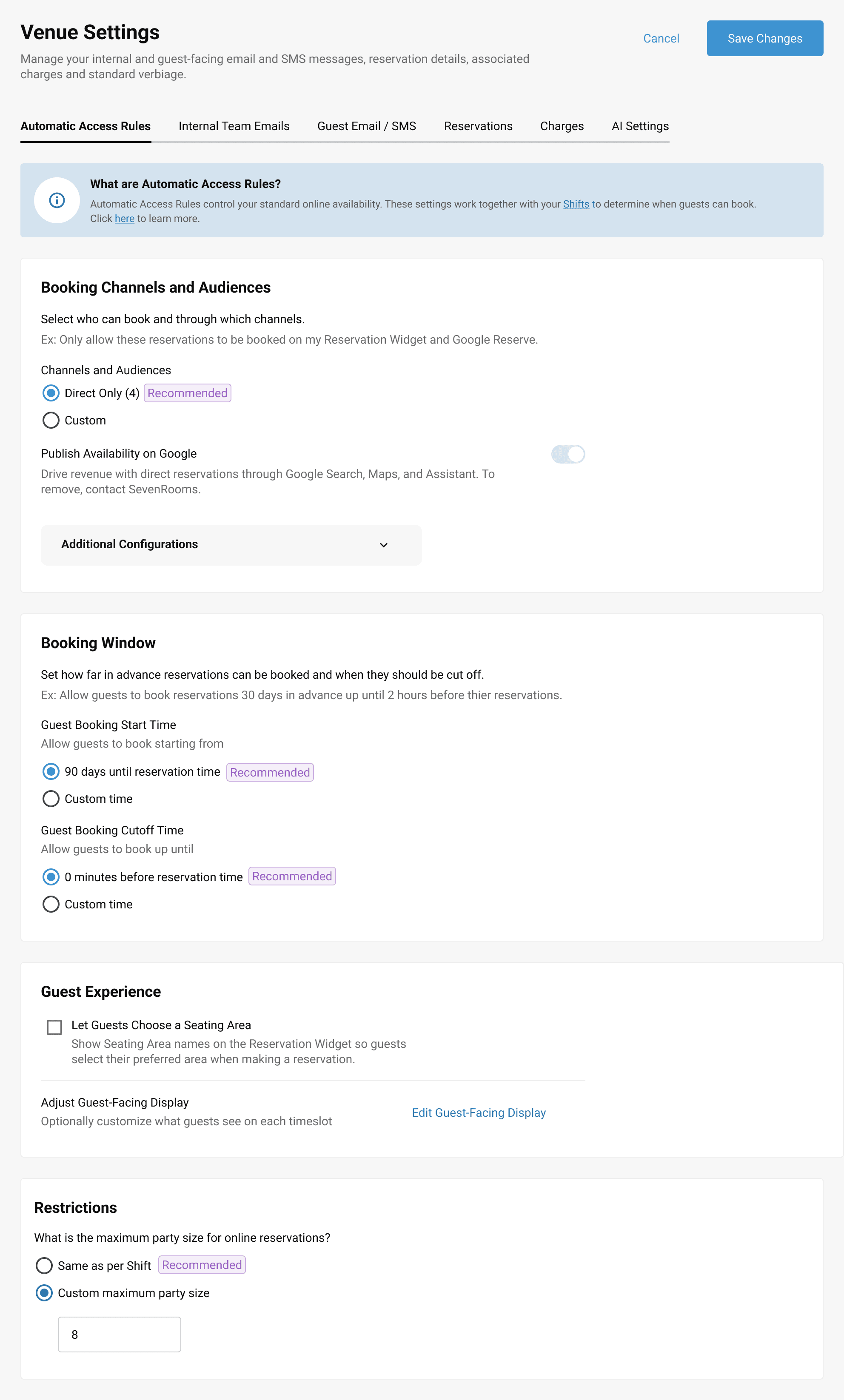
Most venues don't need bespoke Access Rules. They need a sensible default that takes them live. If I could generate that default from a handful of settings, I'd remove the biggest single friction point in onboarding.
Onboarding Efficiency
How might we…
streamline availability setup during onboarding so clients feel capable rather than overwhelmed, while freeing up customer support for high-value strategy?
Solution
Transition to a "Shift Creation Only" onboarding flow to set up standard baseline availability.
Embed Smart Defaults using the most common configurations (e.g. availability by seating area).
Configuration Safeguards
How might we…
protect venue revenue and reduce high support ticket volumes by preventing operators from misconfiguring their access rules?
Solution
Introduce Locked Access Rules that act as structural guardrails to prevent high-impact user errors.
Ensure online availability remains a Constant Default State that cannot be accidentally shut off.
Goals and how we measured them
Streamline Onboarding.
Reduce the time and complexity of setting up availability on the first onboarding call.
Target: availability setup during onboarding drops from 20 minutes to 10 minutes.
Simplify Availability Management.
Let operators reach their desired configuration without duplicating settings across Shifts and Access Rules.
Target: >90% of venues with a standard dining offering go live using Automatic Access Rule Settings (excludes multi-concept, eatertainment, and set-menu-only venues).
Maximize Reservations.
Make sure standard online availability is always live, so new venues don't lose bookings in week one because nobody ticked the right box.
Target: Google Reserve activation in month 1 increases from 35% to 45% (a 28% relative lift).
Trade-off.
Locking the rule took away inline control to prevent mistakes. The Automatic Access Rule is by default set up with "Recommended settings" (industry standard / SevenRooms data) that each Venue can customize. I traded a little power for a lot of safety.
The opt-out told me that trade didn't fit the venues we'd aimed it at.
Honest outcomes
Availability setup time on the onboarding call: 20 → 15 minutes
25% faster across 26 beta venues (NAM + EMEA, Aug–Sep 2025). 58% set up in ≤15 minutes. Longest setup: 27 min vs. 36 min on classic Access Rules. Quickest: 5 min vs. 9 min on classic.
The automatic rule held for standard dining.
4 of 26 beta venues created additional manual Access Rules, all for non-standard offerings (prix-fixe, tasting menu, omakase, large-party bookings), not because the automatic rule was broken.
What I learned
The opt-out didn't come from the advanced operators I'd designed around. It came from the target audience, whose idea of "standard" was more varied than the generator could handle.
The lesson: an automatic default couldn't deliver the customization these venues needed without becoming as complex as the thing it replaced. That exact gap - flexible customization without the complexity - is what the AI agent was later built to close.
Recommended
Customized
"I'm almost able to finish my calls 15 minutes earlier. I actually have time to talk about the next steps instead of being 5 minutes over and late to the next call."
Dagny S., Implementation Partner

EXPERIMENT 2
"Banking" settings on Payments
The bet: why hide complexity when you can bank it?
Availability troubleshooting ticket volume dropped consistently month-over-month through 2025, however the total Availability support volume continued to rise: from .066 tickets per venue in 2024 to .082 in 2025. The system was getting more legible but it was still too complex.
As you know, from the 50 Gong call analysis, shifts settings were repeatedly set-up manually for each shift. So why hide complexity when you can make it re-usable? Today a setting like a payment policy is re-entered on every Shift, and re-updated on every Shift when it changes. What if you configure it once and apply it to many Shifts, edit once, and every Shift referencing it updates?
The concept I was testing: Modes.
Today, a setting like a payment policy has to be re-entered on every Shift, and when it changes, it has to be updated on every Shift.
What is Mode
A Mode is a reusable group of related settings (for example, "Standard Deposit" could include the amount of the deposit, if it's per person or booking, which policy is attached to it, until when edits can be made to the booking from the customer etc) that's configured once and applied to many Shifts. Edit the Mode once and every Shift referencing it updates. If the pattern worked on a surface (payments), it could work for the whole availability system.
The design decision: no new pages, no major backend changes.
I set a hard constraint: no new pages, no major backend changes. We had little resources and time.
Modes had to fit the existing Shift slideout. If I couldn't prove they'd adopt inside the current UX, I had no business asking anyone to rebuild the product around them.
I made "Save custom setting as Mode" the main entry point, so existing venues could move from bespoke per-shift settings to shared ones in place.
Trade-off
Staying inside the old slideout limited what the design could look like. I chose proof over polish: adoption in the real UX was worth more than a prettier standalone surface.
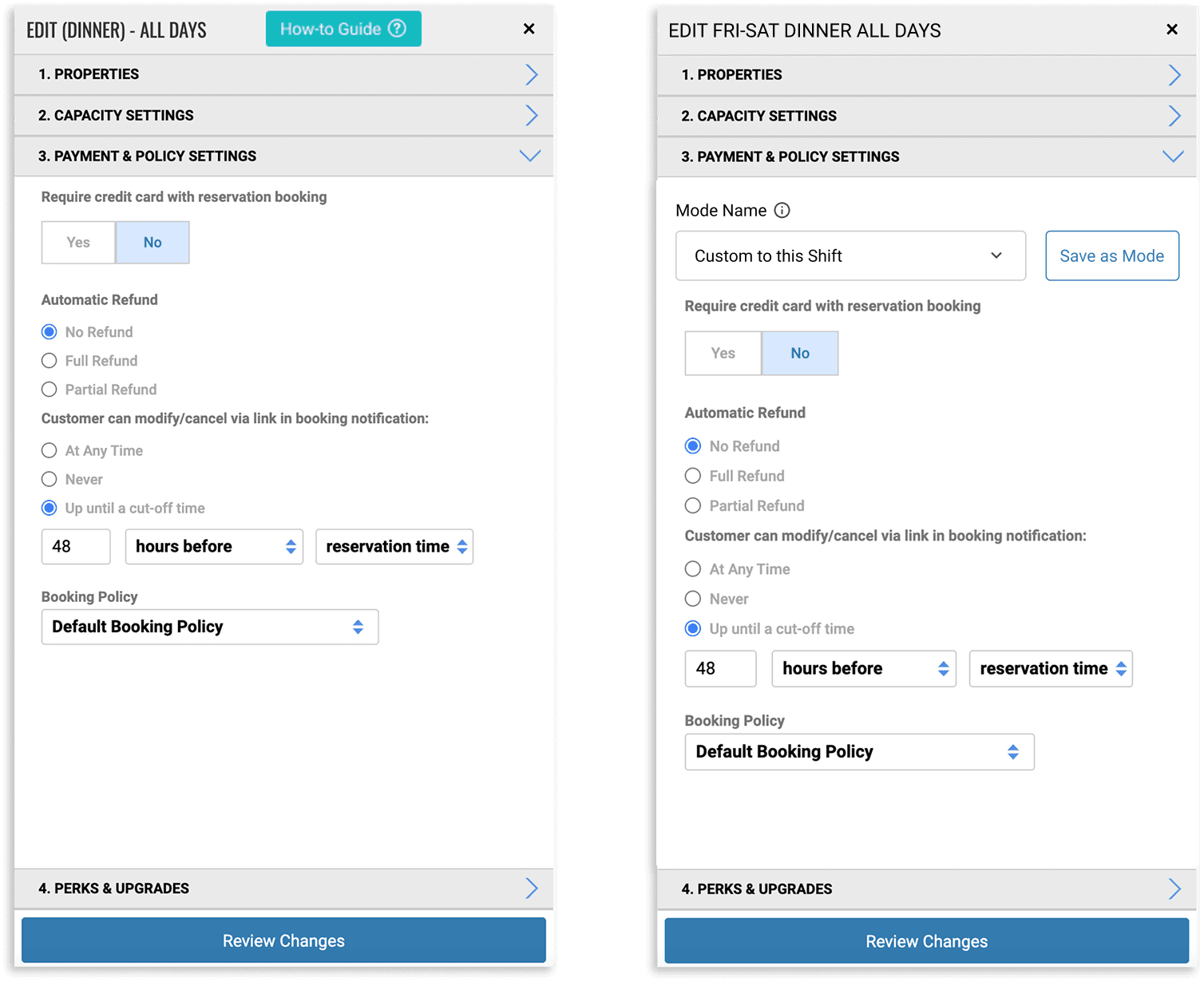
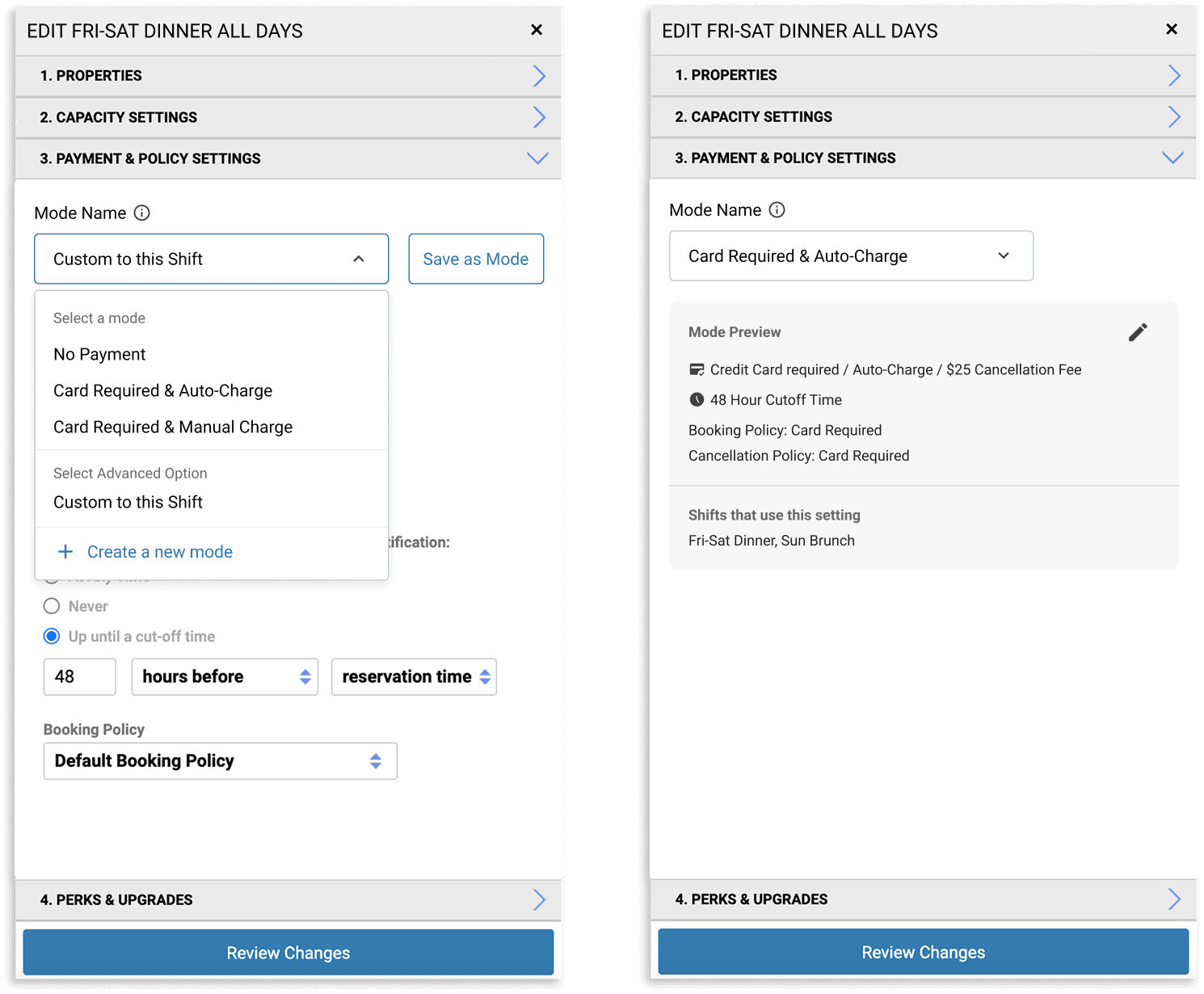
Collaboration: how I unblocked it.
The constraint needed a component that didn't exist: a custom version of our MUI dropdown that could hold both selectable items and an action. The dev team pushed back on building it for one feature.
I made the case differently: I showed the same component was already needed in Marketing and Event Management. Framed as a shared building block, not a one-off, it got built. That dropdown is now used across the product.
Goals and how we measured them
Shift Payment activation: +8% relative lift
About 40% of the squad yearly goal (Increase Shift Payment activation by 20%).
Modes validated at scale.
Modes adopted with no education campaign and no forced migration. That was the signal to commit to Core Availability.
What I learned
Experiment A tried to hide complexity behind a default, and a considerable part of the target audience pushed back.
Experiment B made complexity reusable without taking power away, and it adopted on its own. B was the right way to rebuild.
THE REBUILT
Decouple structure from surface
The bet: Core availability (the re-architecture)
Core Availability scaled the winning experiment into a reusable, lego-style system with one structural move: separate Shifts (which own hours of operation) from availability settings (which work as reusable Modes across Shifts). Modes become the lego-blocks you build a Shift's settings from.
What is Core availability
Today a Shift owns both operating hours and a bunch of settings (which is why venues end up configuring the same settings three times across three Shifts, and why they drift).
Core Availability decouples the two. Shifts set-up now own only hours of operation. All the availability settings are moved into a new, centralized Mode page, where they're organized into eight sections: Layouts, Seating Area Bookability, Duration, Payment & Policy, Pacing Restrictions, Upgrades, Shift Reporting Period Groups, and Advanced. Each Section holds one or more Modes.
A Shift references one Mode from each Section: so eight Modes make up a Shift. Access Rules, which used to have to be configured manually, are now auto-generated from Shifts plus optional online settings.
How might we…
Configuration Redundancy
How might we…
eliminate the need for repetitive data entry when users set up their availability settings across multiple shifts and access rules?
Solution
Introduce Modes to allow setup configurations to be instantly reused across shifts and seasons.
Configuration Guidance
How might we…
proactively guide customers toward the most effective system setups so they feel confident in platform best practices?
Solution
Embed Clear Defaults into Modes to actively steer users away from confusion and toward optimal settings.
Advanced Controls
How might we…
prevent operators from accidentally changing advanced settings without making those critical controls completely inaccessible?
Solution
Move advanced capacity controlling settings into Nested UI Layouts to keep them out of direct sight but still reachable.
Smart Settings Scalability
How might we…
create a centralized hub for automated revenue strategies so customers can easily manage dynamic smart settings in one place?
Solution
Use a modular design that lets users "Attach" Strategies directly to shifts instead of hard-coding them into individual schedules.
Overview of the new Availability setting page which now include Modes, Shifts and Slot plans. Modes and shifts combined create the base of all availability and can be seen in one place.
The design decisions
Standard Modes as defaults. New Shifts start with a standard mode per section, so no one configures from zero. "Recommended" badges guide novices; "Advanced" settings sit behind a flag so they're hard to trip over.
Migration first. Existing venues have a lot of bespoke settings built up over time. I designed a "Custom to this Shift" state: their settings convert to a custom state, they keep working as-is, and they opt into Modes when ready. A one-click "Save as Mode" promotes a custom setup into a reusable one.
A dedicated Modes page. Central management, showing if a Mode is on a current, upcoming or inactive Shift, so operators can see what's in use and what's legacy.
Rollout and measurement.
Core Availability shipped in April 2026 on a phased rollout: 5–10 friendly venues for beta (weeks 1–3), 10% of venues (weeks 3–4), 50% (week 5), GA (week 6). Target metrics:
Reduce Availability troubleshooting tickets per Venue per month from .036 → .024.
Reduce Availability instructional tickets per Venue per month from .055 → .036.
Drive Shift Payment activation up 30% vs. legacy settings baseline.
Reduce overall Availability support tickets per Rx per month from .092 → .060.
Impact
This doesn't just reduce the set up time and the risk of misconfiguration, but is also the foundation that makes AI-driven revenue management possible later. As we thought of dynamic pricing, Flex Capacities, and others, with Modes we could have a centralized place where customers can manage Smart Settings.
THE BIG UNLOCK
What Modes unlocked: AI
The bet: Availability Types (in progress)
The foundation we've built makes intelligent availability technically possible and Availability Types is where the customization gap from Experiment A finally got solved.
The goal
Replace Access Rules entirely. Not with a better version of what they are, but with a system that's intelligent enough to infer what a venue needs. Operators describe what they want in plain language ("a prix-fixe dinner service Friday and Saturday, guest-selectable patio seating, 2-hour duration") and the system configures the underlying rules accordingly.
That's the flexible, per-venue customization an automatic default could never deliver.
The reframe I worked from
With AI, the risk is trust, not capability. The question was never whether the system could configure a venue. It was whether operators would trust a system they couldn't fully audit. So I designed for confidence, not for novelty.
What are the problems and how we're solving for them
Experiences Require Complex and Redundant Access Rules
Access Rules are Versatile, but are Time Consuming and lack Guidance
Misconfiguration Impact Revenue Potential
Revenue Attribution Challenges

The AI agent
It's essentially a chat interface for editing complex availability settings.
It pulls from two sources of intelligence: a knowledge graph of every configuration field and its rules (so it knows "party size can't be -1"), and a library of 7R best practices per experience type. It validates inputs against those rules and pushes back if something doesn't make sense.
The agent will also introduce a structured flag on Access Rules linked to Availability Types so revenue attribution becomes traceable.
Design decisions
The core guardrail: nothing publishes automatically. The agent prepares and previews; the operator always publishes. I fought to keep manual edit available throughout. A human in control is the difference between a tool operators trust and one they don't.
No anthropomorphism. No speech bubbles for the agent's replies. Blurring the line between a person and an AI would have been a manipulative choice, not a neutral one.
One set of settings at a time, so operators aren't drowned in fields, and stay focused on the change in front of them.
Trade-off
Keeping a manual path and manual publish slows the "magic" of full automation. I made that trade on purpose. Trust first; autonomy can come later, once operators believe the agent.
How I validated it
To validate the mental model I built a prototype using a Cursor and deployed to Vercel myself. The prototype tracks whether operators understand the new Type → Schedule → Variations hierarchy, and whether they use AI or manual controls for high-stakes changes.
I also set up the validation stack: Microsoft Clarity for heatmaps and screen recordings, Firebase for event tracking, a shared validation dashboard with PM to track task completion, modality preference, and iteration confidence.
What the prototype is testing: the four risks I'm watching (findings in progress)
Do operators naturally use chat, or revert to manual?
Do they use conversational edits for meaningful changes, or only low-risk ones?
Do they feel safe editing live availability after publishing?
Do they understand the Type / Schedule / Variations hierarchy?
AI (Default)
Manual


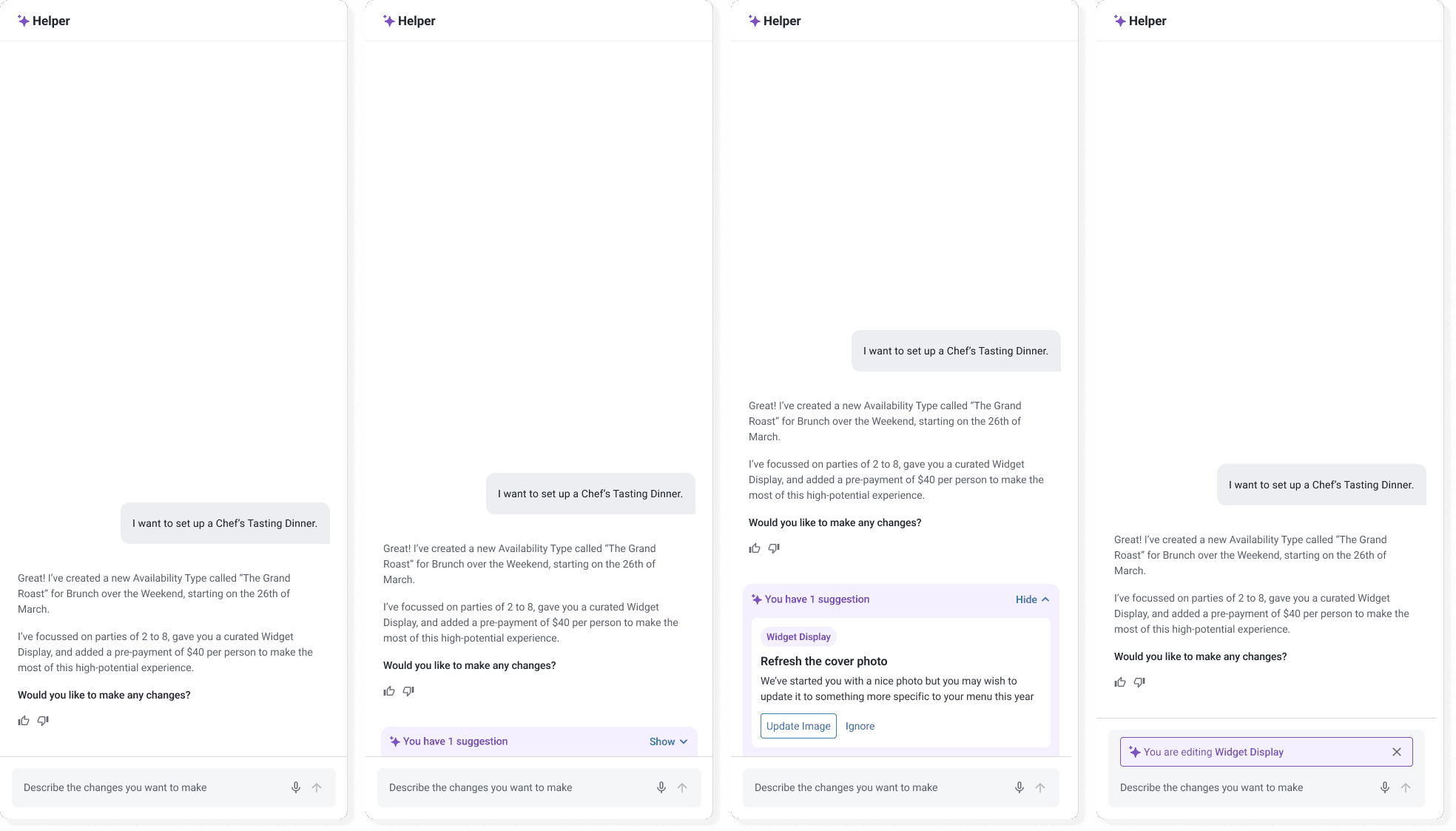
THOUGHTS
What I learned
Sequence so every phase ships value.
No phase was framed as "just a stepping stone." Phases framed that way get dropped the moment a quarterly goal shifts. Self-contained but connected is what kept Eng and PM confidence high.
Migration is the hard part of B2B.
Greenfield is easy. What decides whether a rebuild lands is the path you give existing customers from their old world to the new one.